
Nexa Beep
v0.9.0An end-to-end encrypted messenger with no setup: launch it and colleagues on the same network appear right away
Available on every desktop OS
- About 3.9MB Build size (gate 10MB)
- About 25MB Idle resident memory (gate 30MB)
- 0 Runtime dependencies · administrator rights
- 15 Release assets (installer · portable · deb · rpm)
- 5 × 2 OS targets × distribution channels
- 4 UI languages (en · ko · zh · ja)
Install
Windows
winget — installer
winget install SosomLab.NexaBeepPublished version 0.8.0 (merged 2026-11-06 · checked 2026-11-07); the latest v0.9.0 is in review in PR #473984. For the latest version, download from GitHub Releases below.
winget — portable
winget install SosomLab.NexaBeep.PortablePublished version 0.6.1, behind the latest v0.9.0 (checked 2026-11-07). The 0.9.0 PR #474092 is in review.
Chocolatey — installer
choco install nexa-beepApproved version 0.6.0 (2026-11-02), behind the latest v0.9.0 (checked 2026-11-07).
Chocolatey — portable
choco install nexa-beep-portableApproved version 0.6.0 (2026-11-02), behind the latest v0.9.0 (checked 2026-11-07).
Relay server beepd (optional)
winget install SosomLab.NexaBeepdNeeded only if you run your own server. On Chocolatey it is choco install nexa-beepd; both are at the latest 0.2.6.
- Installer (recommended) — Download
nexa-beep-<version>-windows-x64-setup.exe(for ARM64,windows-arm64) from GitHub Releases and run it. It installs per user (HKCU), so no administrator rights are needed and no UAC window appears. For a silent install, use/S. After installation, launch at system startup is on by default; you can turn it off withapp.autostartin Settings ▸ Advanced. - Portable — Extract
nexa-beep-<version>-windows-x64-portable.zipand double-clicknexa-beep.exe, and that is it. Settings, identity, and history are created only in thedata\folder next to the exe, so moving the whole folder brings your identity with it (USB-portable). Do not deletenbeep-imgdec.exe(the isolated image decoder) in the same folder; without it, initial avatars are shown instead of photos. - Each release includes a
SHA256SUMS.txt. Compare usingGet-FileHash <file> -Algorithm SHA256. - When changing devices or formatting —
data\identity.keyis your identity. If you do not back it up in Settings ▸ Profile, after reinstalling you will appear to contacts as a different person. Chat history does not follow you across devices.
System requirements: Windows 10 / 11 (x64 · ARM64) — no .NET or Visual C++ Redistributable required (static runtime since v0.2.16). Discovery uses UDP 47100 and sessions use TCP 47200 (default), so approve the allow prompt from Windows Firewall on first launch. Because there is no code signing certificate yet, a SmartScreen warning ("Unknown publisher") may appear; continue with "More info → Run anyway". Package manager channel status (checked directly at each source on 2026-11-07): ✅ Chocolatey nexa-beep · nexa-beep-portable 0.6.0 approved (11-02 · choco install nexa-beep). ✅ winget installer SosomLab.NexaBeep 0.8.0 published (merged 11-06 · winget install SosomLab.NexaBeep); the 0.9.0 PR #473984 is in review. ✅ winget portable SosomLab.NexaBeep.Portable 0.6.1 published (winget install SosomLab.NexaBeep.Portable); the 0.9.0 PR #474092 is in review. winget and Chocolatey lag behind the latest release, so get the latest version from GitHub Releases above. If you installed 0.2.14 or earlier through winget or manually and it would not run, update to the latest (the VC++ runtime dependency was removed). Unsigned executables are often delayed by antivirus false positives. For detailed usage, see the user guide.
macOS
Homebrew Cask (recommended — installs the .app)
brew install --cask kiros33/tap/nexa-beepThe app is not yet signed or notarized, and when a quarantine flag is attached to an unsigned app, macOS terminates it with SIGKILL on launch. Cask removes the quarantine flag during installation (a stopgap; signing is on the roadmap), so this is the recommended method on macOS. The tap follows releases automatically, so the latest release is installed. To update, use brew upgrade --cask nexa-beep.
Homebrew Formula (CLI portable)
brew install kiros33/tap/nexa-beep-portableFor using it without a window as a terminal client (--chat-live) or running the CLI through a server. You can also open a window with nexa-beep --window --live.
- Manual installation — Open the
.dmg(x64 · ARM64) from GitHub Releases and dragNexa Beep.appinto the Applications folder. Because it is not yet signed, if Gatekeeper blocks it the first time you open it, remove the quarantine flag withxattr -dr com.apple.quarantine "/Applications/Nexa Beep.app"or use the Cask method. - Data is created in the user settings folder (for portable,
data/next to the executable).identity.keyis your identity, so back it up in Settings ▸ Profile.
Native assets are available for both Apple Silicon and Intel. Notifications use the proper UNUserNotificationCenter path, so permission for notifications is requested on first launch. If a network permission prompt appears for discovery (UDP 47100) and sessions (TCP 47200), approve it.
Linux
Register the APT repository — Debian · Ubuntu (first time only)
sudo curl -fsSLo /usr/share/keyrings/sosomlab-archive-keyring.gpg https://pkg.sosomlab.com/sosomlab-archive-keyring.gpg
sudo curl -fsSLo /etc/apt/sources.list.d/sosomlab.sources https://pkg.sosomlab.com/apt/sosomlab.sources
Registers the SosomLab signed package repository (pkg.sosomlab.com). Skip this if you already registered it for another SosomLab app.
Install with APT (recommended)
sudo apt update && sudo apt install nexa-beepUpdated automatically with each release. After this, sudo apt upgrade gets you new versions.
Register the DNF repository — Fedora · RHEL family (first time only)
sudo curl -fsSLo /etc/yum.repos.d/sosomlab.repo https://pkg.sosomlab.com/rpm/sosomlab.repoSkip this if you already registered it for another SosomLab app.
Install with DNF
sudo dnf install nexa-beepTo update, use sudo dnf upgrade nexa-beep.
Direct rpm install
sudo dnf install ./nexa-beep-<version>-linux-x64.rpmReplace with the file name you downloaded from GitHub Releases (available since v0.3.0).
deb package
sudo dpkg -i nexa-beep-<version>-linux-x64.debReplace with the file name you downloaded from GitHub Releases. A desktop entry and XDG autostart (user level · on by default) are registered along with it.
Portable
tar xzf nexa-beep-<version>-linux-x64-portable.tar.gz && ./nexa-beepExtract and run right away. Persistent data is created in data/ next to the executable.
Homebrew Formula (portable)
brew install kiros33/tap/nexa-beep-portable0.9.0 published · x64. An option if you use Homebrew on Linux.
Only x64 assets are currently provided. .deb packages of v0.2.17 and earlier do not run on Ubuntu 22.04 · Debian 12, so use v0.3.0 or later. Notifications use the desktop notification path and the tray is implemented, and Linux real-device verification was carried out intensively in v0.2.10–v0.2.14, confirming app menu launch, tray focus, following the system theme, and the clipboard (Wayland · X11) on real systems; if problems remain, please report them as a GitHub issue. To run your own relay server, use brew install kiros33/tap/nexa-beepd (Linux · macOS Apple Silicon) or the release asset nexa-beepd-*-linux-x64.tar.gz (musl static · a single binary for any distribution), and open both TCP and UDP 47300.
No server address, no account, no contact registration. When you launch it, people running it on the same network appear in the list automatically; pick one and you are talking over an end-to-end encrypted session. Received files must pass quarantine → scanning → approval before they come out as real files, and contacts on other networks are reached through a relay server that cannot see content. Build size about 3.9MB · idle resident memory about 25MB · 0 runtime dependencies. (Windows · macOS · Linux)
Screenshots
Key Features
- Launch = join (zero configuration) No server address, account, or contact registration at all. When you launch it, people on the same LAN appear in the list automatically; pick one and start talking. 0 inputs before your first conversation.
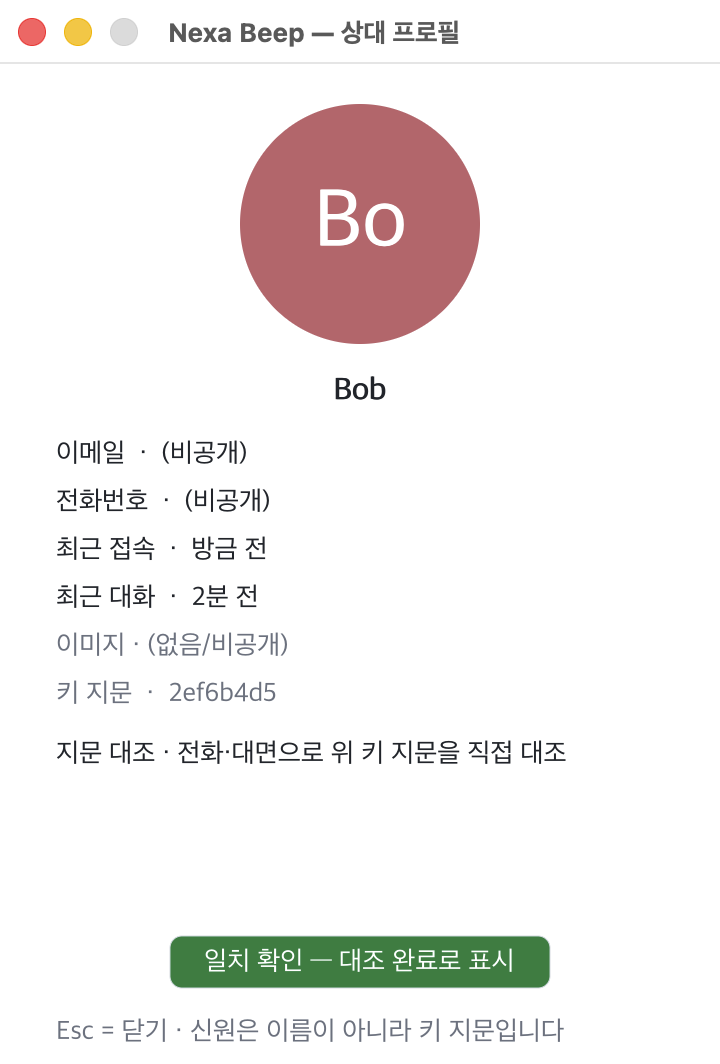
- End-to-end encryption + key pinning (TOFU) Noise_XX (X25519 · ChaCha20-Poly1305 · BLAKE2s) sessions. Identity is the key fingerprint, not a name, and the pin fixed at first contact is stored encrypted and persists across restarts. You can compare fingerprints over another channel to promote a contact.
- 4-step safety gate for received files Negotiation → .beepq quarantine → scanning (extension · magic bytes · zip structure · Windows AMSI) → release only on human approval. The app never executes received files, and released files carry an OS quarantine mark (MotW · quarantine).
- 10GB-class streaming transfer · resume Large files are sent without loading them into memory, and the hash is computed during transfer. If interrupted, the received portion is kept sealed and the transfer resumes from N%, and both sides see the same state through ⏸▶✕ in the bubble. Per-request approval (up to 5 files) · size limits · bandwidth negotiation.
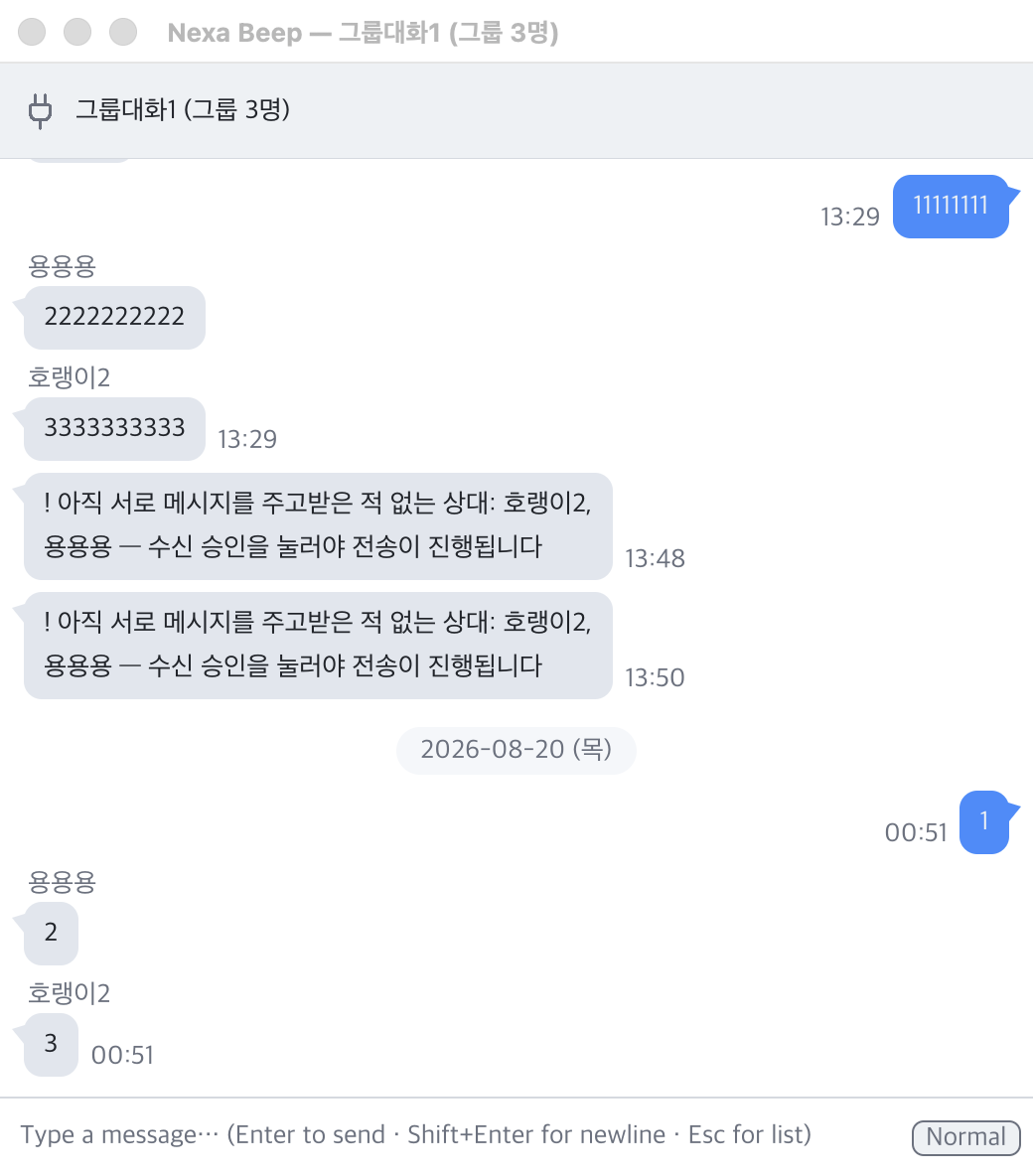
- Shared group chat All members see the same room. The roster signed by the owner is the source of truth, and a room appears only after you accept the invitation. Group history is also stored encrypted, and files fan out to members.
- Contacts on other networks: the relay server Switch Settings › Server to Managed and click [Test] once to register with the official server (beepd.sosomlab.com). Rendezvous → UDP hole punching → relay fallback. The server sees only a rendezvous ID that changes daily and can neither read nor store content.
- 0 plaintext on disk Chat history, quarantined files, PII, the profile cache, and trust pins are all sealed and encrypted (measured audit completed). Deleting a conversation = discarding its data key (crypto-shredding). Data is created only in the data/ folder next to the exe. The only exception is the settings JSON you create yourself (Export · Edit JSON), which is plain text and contains the pairing secret.
- Same screen on 3 OSes · Windows ARM64 Every pixel is drawn by the app, with no OS widgets or UI framework. 19 custom controls, dark and light themes, 4 languages (English · Korean · Chinese · Japanese), and Korean IME support based on real measurements.
- Lightweight: 3.9MB · 25MB idle Pure Rust native code with 0 runtime dependencies. Build size ≤10MB and idle ≤30MB are enforced by a CI gate; measured values are about 3.9MB build size and about 25MB idle resident memory (macOS · Windows is lower).
- Tray residency · notifications · auto-start The tray icon is composited from your avatar, and clicking a notification opens that conversation. It auto-starts at the user level at system startup (on by default · opt-out), and administrator rights are not needed anywhere.
- Delivery and read receipts · offline chat · My status One dot next to your message = delivered, two = read (color-blind-safe dual encoding). The chat window opens even when the contact is off, and waiting messages are delivered as soon as the contact appears (persists across restarts · v0.6.0). If you set your status to Offline, you disappear from other people's lists and make no connections. Message priorities and announcement broadcasts are supported.
- Replies · bubble text selection and copy Right-click a bubble ▸ Reply to send with a quote; clicking the quote returns to the original (1:1 · group). Select bubble text by dragging or double-clicking and copy it (v0.7.0).
- Receive restrictions · holding messages from strangers Right-click in the list to block a contact for 1 hour · 24 hours · 7 days · forever, and block IPs, ranges, and display names too. Blocked contacts cannot learn they were blocked. Message and connection floods are blocked automatically for a short time, and there is an optional feature (off by default) that delivers first messages from strangers as a Message request card (v0.8.0).
- Your PCs as one user Your PCs with the same handle + pairing secret recognize each other as "My device" without approval or fingerprint verification (purple badge). Sibling sessions use Noise XXpsk3 with a secret-derived PSK, the user key is replicated automatically, and lost devices are revoked per device in the My devices list (v0.3.1). Messages sent from your other devices and a contact's multiple devices continue in one conversation (v0.4.0), and a device that was off catches up on missed conversations and read status the moment it is turned on (v0.5.0). The secret never goes to the server.
- New settings screen · shared file dialog Settings rebuilt with a group tree, search (even while composing Korean), per-item cards, and an Advanced settings switch, plus file open and save dialogs that look the same on 3 OSes. Open it directly from the tray menu or with ⌘/Ctrl+,. Since v0.7.0, it has added a Changed view that shows only the settings you changed, JSON export, import, and edit, and fast scroll.
- CLI terminal Take part with only a terminal using the command nexa-beep --chat-live name. View discovered contacts with /peers and pick one to talk to with /connect; file sending and receiving, approval, and read receipts all follow the same rules as the GUI.
Features in Detail
Discovery · connection
Devices find each other with no prior registration, and you can connect by hand on networks that discovery cannot reach.
- Automatic LAN discovery (UDP 47100) A multi-stage fallback ladder (S1–S4) that sends IPv6/IPv4 multicast and broadcast at the same time. Discovery packets are unsigned hints carrying only presence, display name, and port, never profiles, contact details, or messages. New contacts simply appear in the list and do not steal the window; opening a conversation is up to you.
- Connect directly by address (⌘/Ctrl+K) Contacts on another subnet or across a VPN are connected by entering an address such as
10.0.0.5(port omitted = default47200, with[v6]:portformat validation). Manually registered contacts stay in the list even after you close the chat window and reconnect to the remembered address. When using the relay server, paste the contact's 64-character fingerprint into the same window. - Session port 47200 · status bar display Sessions bind the default port
47200first (falling back to a random port if in use), and the status bar always shows the port actually being listened on. You can change it with thenet.session_portsetting and the--port <N>argument, so firewall exceptions are predictable. - Dead connection detection · automatic reconnection TCP keepalive detects deaths without a FIN (power cut, forced termination, network outage) within about 22 seconds and turns the list dot red. Dropped contacts are retried with a 5 s → 15 s → 60 s → 5 min backoff, and an automatically established connection does not open a window. All connection setup runs on worker threads, so clicking a dead contact does not freeze the screen.
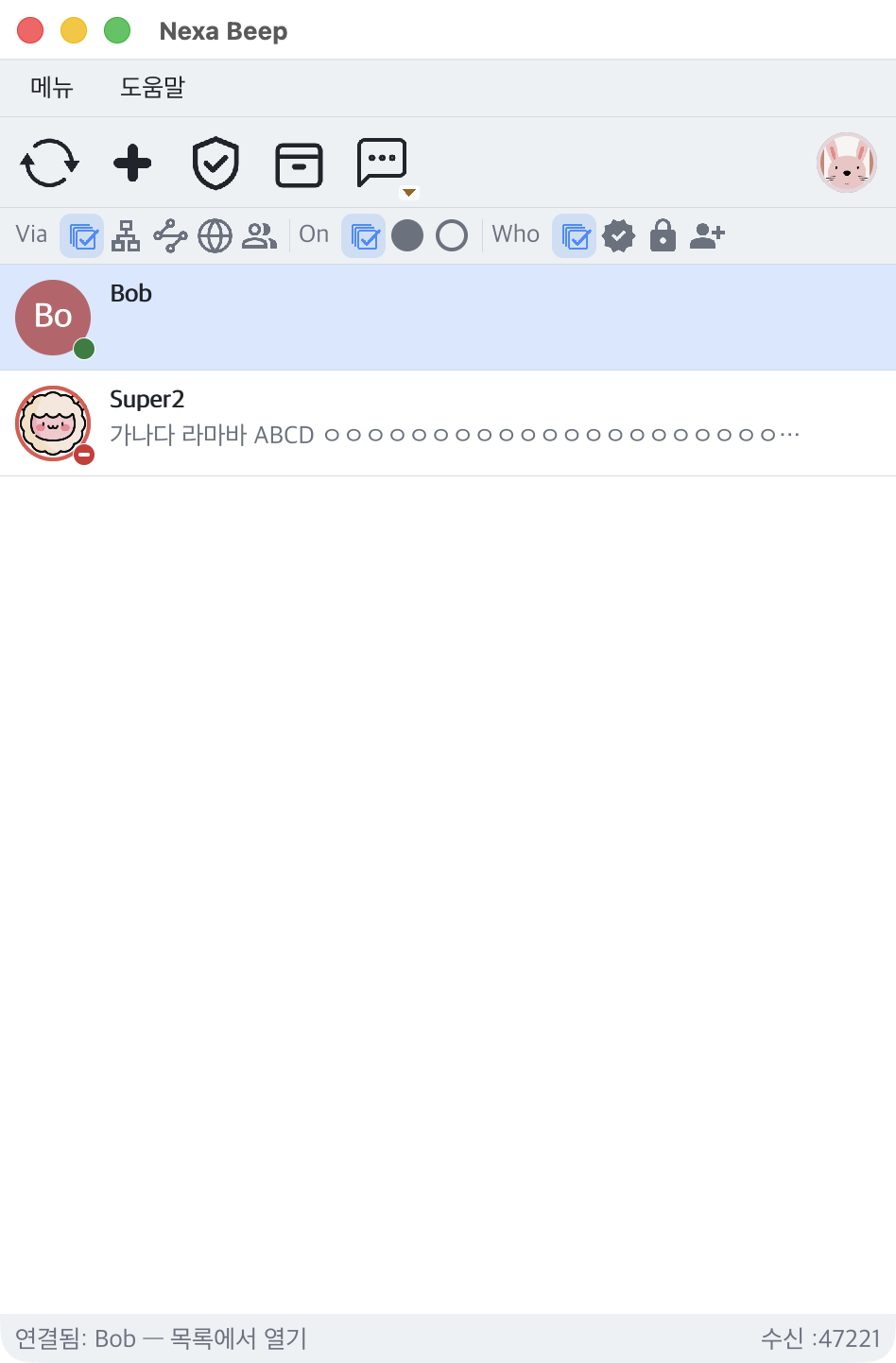
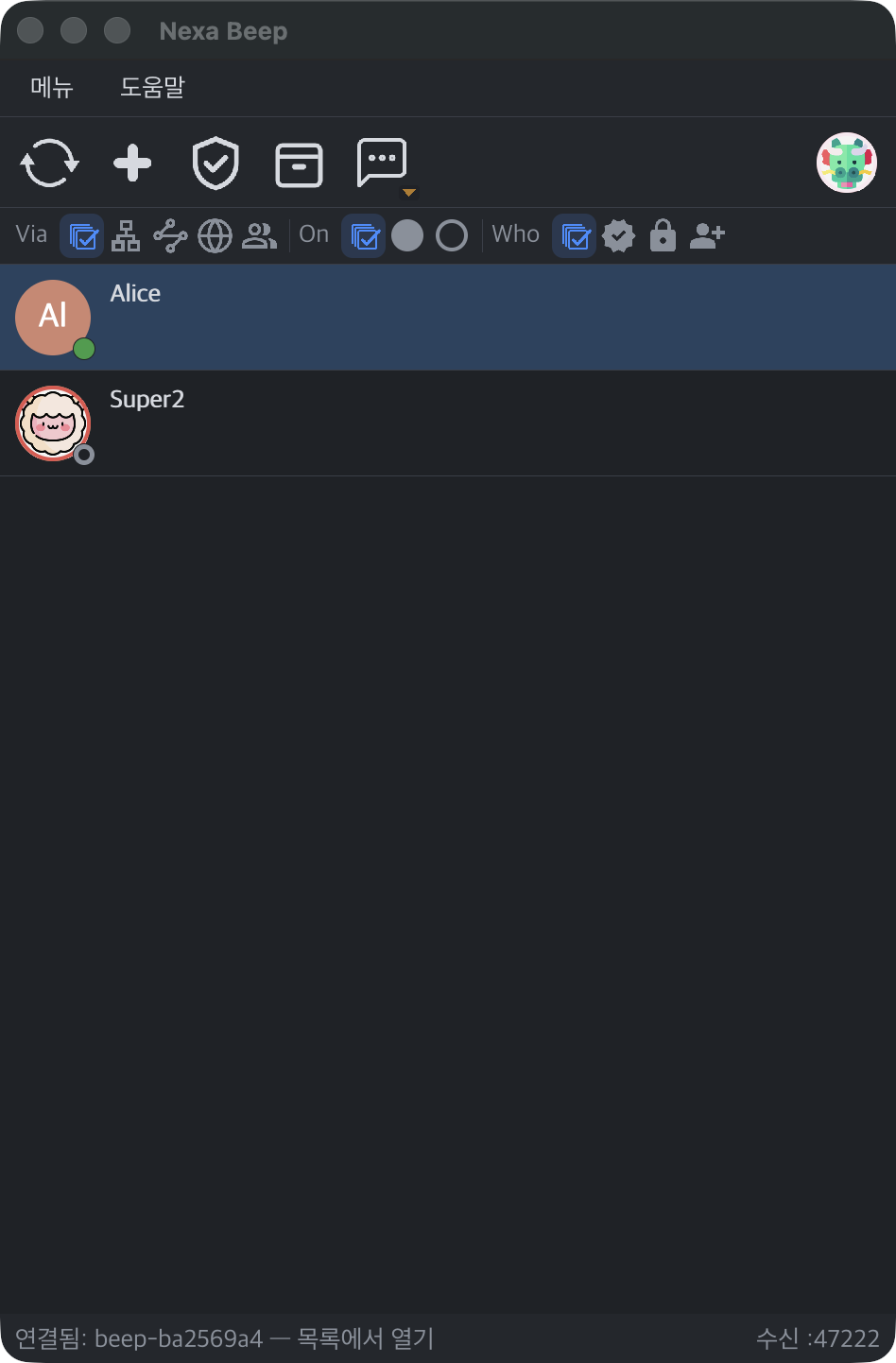
- Presence display: color × silhouette List dots have 2 axes: color = reachable right now (session, LAN discovery, or server public list) and silhouette = whether a session exists. Green (in conversation), blue (trying to connect), red (dropped), and gray (discovered only) use dual encoding designed for red-green color blindness and low contrast.
- List filter bar (v0.2.6) 3 groups of icon chips below the toolbar: Via (All · Local · Server · Internet · Group) · On (All · Online · Offline) · Who (All · Verified · Pinned · New). Your selection is saved and persists across restarts, and all chips and toolbar buttons have tooltips. Contacts known only from the server public list appear only under the Server chip until you have exchanged traffic, which reduces the spam surface.
- Offline row cleanup · version mismatch display (v0.8.0) Offline rows remain only for contacts with chat history, a registered manual address, a pin to the top of the list, or your own devices, so contacts you never chatted with do not pile up. Contacts on a different protocol generation or a newer wire version do not silently disappear but show as "Version mismatch — can't chat until one side updates", and you can check the contact's app version on their profile card.
- 4 list sort modes · pinning · type-to-search Sort by recent conversation (default), name, last seen, or online first, and pin frequent contacts and groups to the top with ★. Rows show an unread message count badge and last-checked time, and the window title shows "N new messages" so it is visible from the taskbar as well.
Identity · trust
Names, IPs, and what users claim are not the basis of identity. Identity is the device key fingerprint alone.
- Noise_XX end-to-end sessions X25519 · ChaCha20-Poly1305 · BLAKE2s. The handshake proves key ownership, and all subsequent payloads are encrypted with AEAD. The absence of plaintext on the wire is locked in by tap tests, and files also travel on a File stream within the same encrypted session, not on a separate port.
- TOFU pins: encrypted persistence · fail-closed The key is fixed at first contact, and after that only the same key continues the trust. The pin file is "the full list of contacts I know", so it is encrypted itself, and on corruption or key mismatch it does not silently re-pin but closes by treating everything as unverified and showing a locked state. Reused names trigger a warning.
- Promotion by fingerprint comparison (/fingerprint → /verify) Print your fingerprint and the contact's with
/fingerprint, and after matching them over another channel such as by phone or in person, promote the contact with/verify(or the Matches — mark as Verified button on the profile card). If you promote after asking "Did you check?" inside the very channel you are trying to authenticate, a man in the middle could answer that exchange too, so out-of-band comparison is a prerequisite. Revert with/unverify. - Trust badge family Unverified · Pinned · Verified · Blocked · Name conflict · First contact are distinguished by color and silhouette. Real names and contact details in a profile are merely "claims of this key", so they are shown together with the trust badge, and the app does not pretend to guarantee what it does not guarantee.
- Identity key backup · restore · no real-name broadcast
identity.keyis your identity, so back it up and restore it in Settings ▸ Profile (hot loading). The default display name is the host name with anything that looks like a real name removed (beep-{fingerprint}if that cannot be determined), so real names are not broadcast in plaintext on the LAN, and changes are re-announced immediately.
Multi-device identity: your PCs as one user
A handle is only a label, not an identity. Trust rests on a key derived from the pairing secret and proof inside the session, and the default is off (standalone node).
- Handle + pairing secret: two lines and you are done Turn on the Multi-device identity switch in Settings › User, and a handle and pairing secret are filled in with default values and authenticated right away. Enter the same handle and the same secret on your other PC and you are done. The secret is known only to your own devices, never goes to the server, and is stored sealed on this PC; the generate icon turns red on the first click and only changes the secret if you click again within 5 seconds.
- Sibling sessions: Noise XXpsk3 + proof inside the session An XXpsk3 handshake is established with a PSK stretched from the pairing secret using PBKDF2, and membership is confirmed by an HMAC proof bound to the handshake. Inbound connections distinguish regular XX from XXpsk3 by the first message, adding no round trips. On the same LAN, devices meet through a hint at the tail of the discovery packet; on different networks, through pairing rendezvous on a managed server (3 RIDs derived from the handle and secret), and the server is unchanged and sees only the envelope.
- Automatic user key replication · signed device list When two PCs first meet, their user IDs are automatically merged into the one created first (in about 30 seconds · "the older key wins"). A signed device list (UserHello) travels over the session to tell contacts the set of devices belonging to the same user, and if a different user key uses the same handle, a ⚠ mark appears in the list.
- Purple "My device" badge · 0 approvals PCs with the same values recognize each other as your own devices without approval or fingerprint verification: a purple authentication badge on the list row and "My device — authenticated with the same user key" on the profile card. Files are also received without approval, but quarantine and scanning remain. Removing trust is a single path: cutting just the one sibling relationship releases the trust decisions in all 12 places together.
- Lost devices: user key rotation · succession chain The Rotate user key button (red → click again within 5 seconds) revokes all devices except this PC. Then change the pairing secret and re-link each device you still have by entering the new secret, and on your contacts' side the old ID carries over to the new ID automatically through a succession certificate (Succession). A succession chain is kept for consecutive rotations, transitive checks prevent rollback, and honest conflicts are shown rather than hidden.
- My devices list · per-device revocation (v0.3.1) In Settings › User › My devices [Open…], view the devices linked with the same handle and secret in a table (name · short fingerprint · this device/connected/offline · last seen). To remove a lost device, click [Revoke] twice within 5 seconds on its row; the remaining devices receive the new user key automatically.
- Sent copies · collapsing contact devices (v0.4.0) Messages sent from your other devices also appear in this device's chat window (sent copies), and a contact's multiple devices are collapsed into one row · one conversation. Messages are delivered to all of the contact's devices that are on.
- Conversation catch-up · read sync (v0.5.0) When you turn on one of your devices that was off, conversations exchanged on other devices in the meantime come in automatically from sibling devices (by default the latest 200 lines per conversation · 1MiB per session · text only, with file contents not caught up). Since v0.6.0, you can choose lines per conversation (50·100·200·500) and data per session (1·4·16MiB) in Settings › User. A conversation read on one device also clears the unread badge on other devices. All of this travels only inside encrypted sessions between sibling devices and nothing is stored on the server.
- My devices that are off (v0.6.0) Even when a device linked with the same handle and secret is offline, it is treated as yours based on the last signed device list, so its chat window does not wrongly show a fingerprint verification notice. You can turn this off at Settings › Advanced › Trust judgement › Use last signature when offline (on by default).
Chat
KakaoTalk-style bubbles, delivery and read dots, an offline queue, and input box commands: all the messenger basics are here.
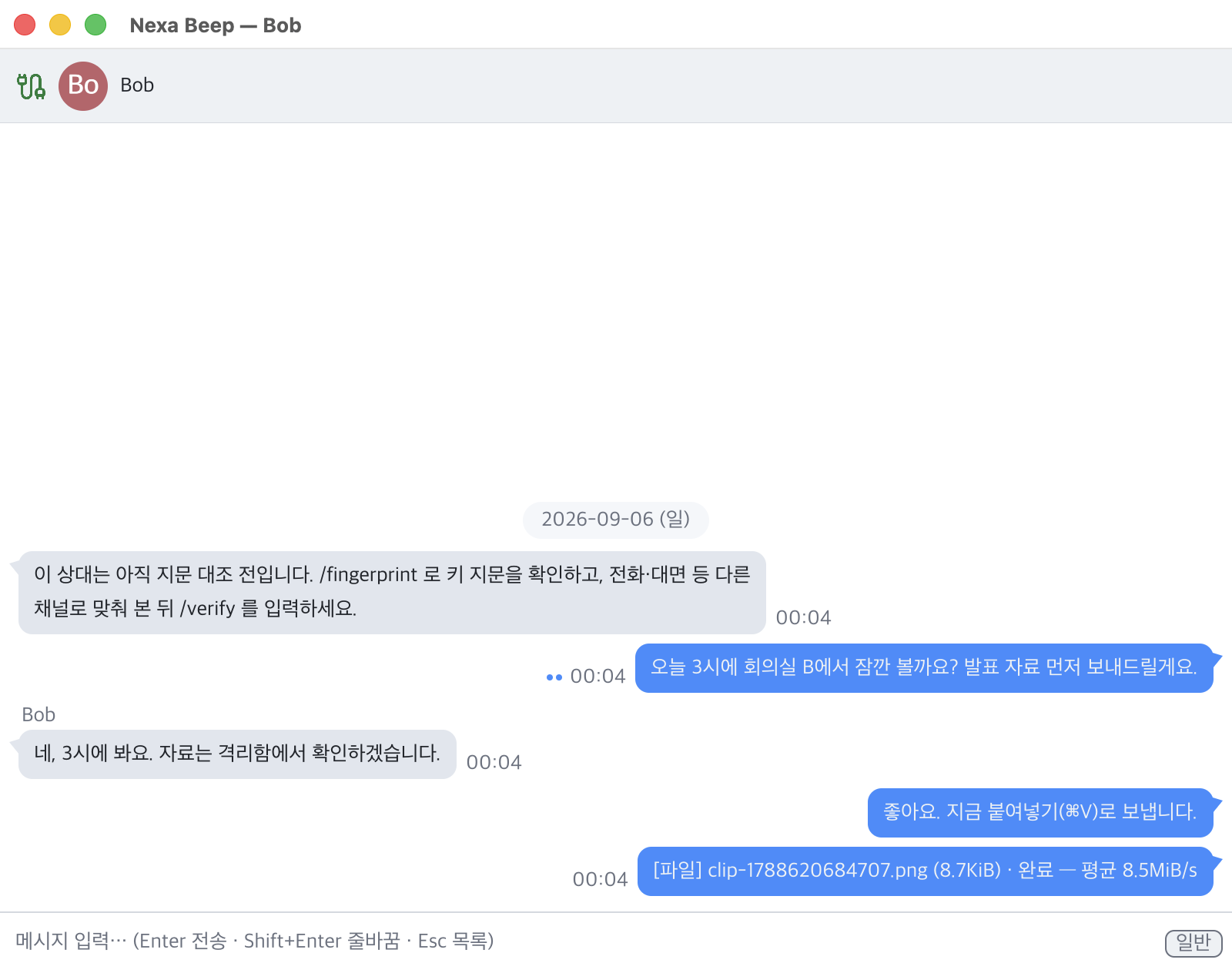
- Bubble chat window Left and right bubbles with tails, minute-level times, date pills, Shift+Enter multiline, right-click menus on bubbles and the input box, and the full set of text editing basics: select all, copy, cut, paste, double- and triple-click, Shift+arrow selection, and horizontal scrolling. The chat header (48px) shows the contact's avatar and name along with a route badge (via server blue · via internet orange).
- Delivery and read receipts 1 dot next to your message = delivered, 2 = read. The two axes are fully independent, and read status is handled automatically based on the active window. Both are controlled by the recipient's settings (default On), with a privacy gate that sends them back only to verified contacts.
- Replies (v0.7.0) Right-click a bubble ▸ Reply → a "Replying" bar above the input box (Esc or × to cancel) → a quote block (sender: excerpt of up to 120 characters) at the top of the sent bubble. Clicking the quote scrolls to the original and briefly highlights it. Your own and older messages can be replied to as well, in both 1:1 and group chats. Since v0.8.0, for contacts on v0.6.1 or earlier, or whose version is not yet known, the reply automatically becomes a regular message with the quote as one line before the text so that the content arrives (only the jump to the original is missing), and lines received through catch-up also carry reply references.
- Bubble text selection and copy (v0.7.0) Within a single bubble, drag or double-click (word) to select, then copy with
⌘/Ctrl+Cor right-click. The selection is shown inverted and dimmed in an inactive window. After copying, the status bar shows "Copied N character(s)" and an instant message (HUD) appears; change whether it is shown, its position, timing, colors, and opacity in Settings › Appearance › Instant message. - Shorter message round-trip latency (v0.8.0) Each session has a dedicated write thread, so receipts do not wait for the next receive wait. Measured on the same PC, p95 went from 210ms → 5ms (actual 2-PC values on a real LAN were not measured).
- Chatting with contacts who are off: offline wait (v0.6.0) Even if the contact is off or the connection fails, the chat window opens so you can view history and send messages. Lines you send are kept on your PC (persists across restarts) and delivered the moment the contact appears. Lines sent later show both the typed and sent times, like
13:06 ▸ 13:40. The limitation is stated plainly: this is a sender-side queue that delivers only while your PC is on, not server storage. - My status: Online / Offline (v0.6.0) Menu ▸ My status or Settings › System › My status. When set to Offline, the app stops announcing itself so you disappear from other people's lists, open conversations are disconnected, and no new connections or server connections are made. Messages you send wait, and are delivered when you go back online and the contact appears. While offline, the tray icon is dimmed with a gray dot and the window title shows "— Offline" (v0.6.1).
- Message priority · announcement broadcasts Give messages a priority to differentiate notification strength, and send an announcement to several contacts at once. Notifications go through a trust gate that makes those from unverified contacts silent.
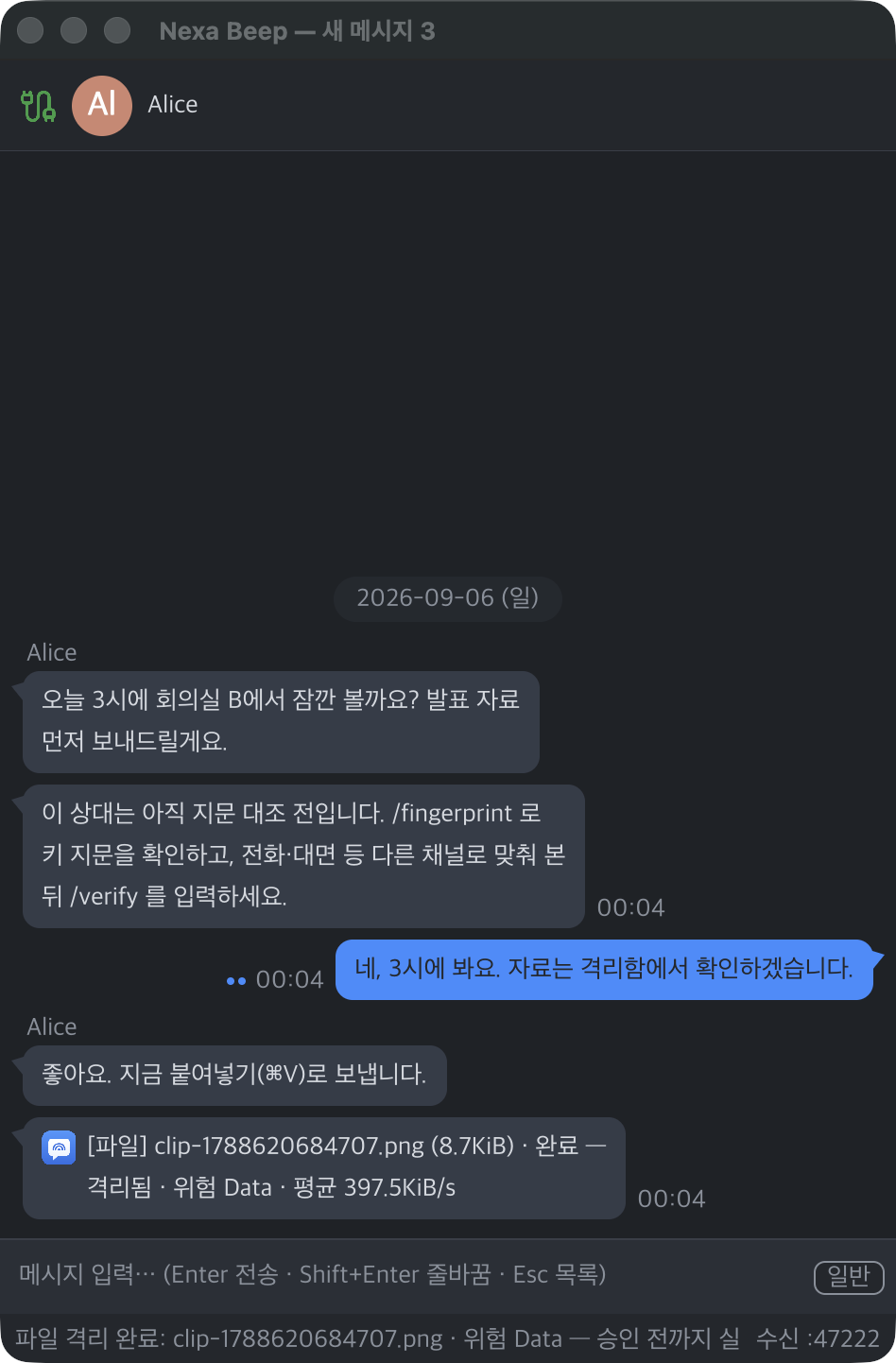
- Clipboard image sending (Ctrl+V) Paste a captured screen into the input box and it is sent right away as an image (3 OSes). The recipient's preview is decoded by an isolated process.
- Input box / commands A line starting with
/is a local command, not a message:/help·/fingerprint·/verify·/unverify·/trust·/close. With a leading space it is sent as a message,//hellois sent as/hello, and mistyped commands are neither sent nor executed; only a hint is shown. - Conversations: managing history Manage saved chat history with a list, preview, and filter; click to open, delete with 2-step confirmation, and back up or restore it in its sealed envelope.
File transfer · safety gate
Files are not trusted, whoever sent them. A received file must pass four steps before it becomes a real file.
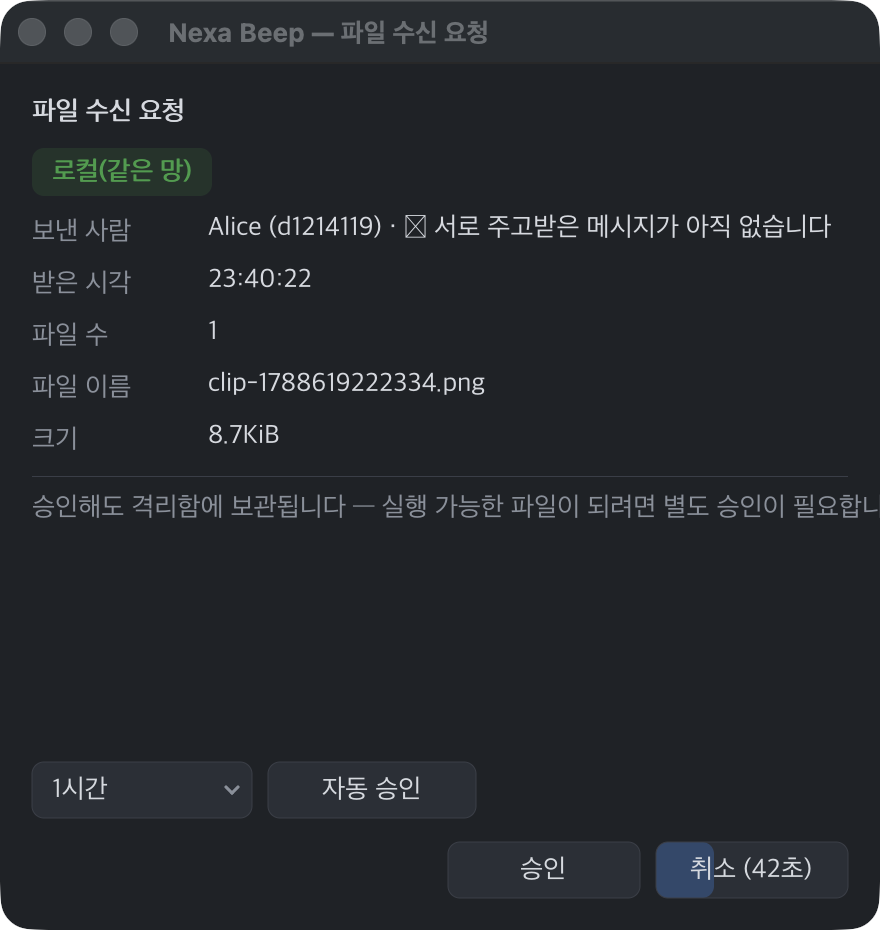
- ① Negotiation Eligibility (pin + two-way conversation), receive policy (auto/timed/manual/reject), size limit, and speed are agreed first. If a file is blocked before mutual conversation, a modal shows "why + what to do" (making the anti-spam rule visible). The contact's limit is checked before sending, so oversized files are blocked before being read.
- ② Quarantine: .beepq seal The original is not unpacked; it enters Quarantine as a
.beepqseal containing the hash and metadata. A transfer is confirmed "Done" not by a socket write but only by an end-to-end acknowledgment (ack) of successful quarantine on the receiving side ("Delivered · awaiting confirmation" → Done). - ③ Scanning The risk level is determined from the extension and magic bytes (fail-closed), and zip files are never extracted; only the central directory is read to catch bomb structures (including zip64 · encrypted zips, nested archives, and non-zip formats are "Undetermined"). On Windows, files go through a real AMSI scan by the installed antivirus (measured with EICAR). Labels state only the facts: "Scanned (nothing detected) / Scanned (detected) / Not scanned".
- ④ Release after approval A person must approve before a file goes to the Downloads folder. After hash re-verification and execute bit removal, an OS quarantine mark (macOS quarantine xattr · Windows MotW
Zone.Identifier) is left so that SmartScreen and Gatekeeper protection continues. The app does not execute files or open links automatically. - Streaming + deferred hash Even 10GB-class files are sent without loading them into memory, and the UI does not freeze. The hash is computed incrementally during transfer and verified on completion, so the approval window appears immediately. The receive limit defaults to 512MiB (configurable), and sending is unlimited.
- Resume · in-chat controls The partial data from an interrupted transfer is kept sealed for up to 72 hours/1GiB, and on reconnection the transfer resumes from N% (prefix hash comparison · starts over on mismatch). With no separate transfer window, sender and receiver both see the same state through ⏸▶✕ in the bubble; a combined batch banner and cancel-all propagate over the wire, and transfers left paused are canceled automatically after 2 minutes.
- Progress based on receiver confirmation (v0.8.0) Progress on the sending side rises only as far as the receiver has reported receiving (chunk window · backpressure), so it does not run ahead with "100% sent". With contacts on older versions, it works the previous way.
- Per-request approval Drag and drop several files for 1 approval (showing file count, name list, and total), and 1 rejection = the entire batch. Maximum files per request is 1–5 (default 5), and oversized files and folders are marked "Excluded" in the lists on both sides.
- Isolated image decoding (nbeep-imgdec) Image parsers have historically been a regular route for RCE, so the main program does not link any parser. Avatars, received image previews, and zoom are decoded by a separate process, and the main program re-verifies the pixels (16MiB source limit · parent kills it on timeout · SVG not supported). Without the decoder, it quietly falls back to initial avatars.
Group chat
Not a one-to-many send but a shared chat where all members see the same room, with end-to-end encryption intact.
- Shared group chat Everyone sees one thread with sender avatars and name labels. There is no separate group key; messages fan out over the existing 1:1 sessions, so E2E is kept as is. This is a different contract from a local "broadcast group" (one-to-many), so the UI distinguishes them.
- Owner roster · invitation acceptance The source of truth for a group is the roster signed by the owner, and its version increases monotonically to prevent replay of older versions. Even if you are on the roster, the room appears on your screen only after you accept (no unauthorized joining); invited rooms remain after a restart, and a click = accept/decline. Members can also request invitations.
- Invitation lifetime management (v0.8.0) The invitation card offers 3 choices, [Later][Decline][Accept], and you can choose "Don't invite me to this group again"; a decline can be undone for a short time (5 seconds by default). The owner sees each member's invitation status and can re-invite at an interval (24 hours by default), and invitations expire after 7 days by default. Change these in Settings › Advanced › Group invites.
- Persistent history · self-recovery Group history is stored in the same encrypted segments as 1:1 conversations, is restored after a restart, and preserves sender labels. Segments locked to an old identity are moved to storage at startup and recovered automatically.
- Auto-connecting unconnected members · resync Unconnected members are connected automatically and then receive the message, and on reconnection the sender resyncs the portion it kept (with a configurable limit). Group files are uploaded once per member, and if interrupted, they continue over the same group path when that member reconnects (v0.8.0); an improvement that reduces this with a content key envelope is at the design-complete stage.
- 3-identity real-device verification A record of verifying invitations, acceptance, messages, file fan-out, and restart recovery on real devices, with three identities in one room, is kept in the repository docs (33 Group Chat Test Guide).
Relay server: contacts on other networks
On the same LAN the direct route always comes first, and the server is optional. If the server dies, LAN chat keeps running; if there is a server, content still stays closed.
- Official default server · 1 Test In Settings › Server, change the mode to Managed and click [Test] once; the address and port already default to the official server
beepd.sosomlab.com:47300. Changing the mode or values does not connect automatically; only a successful Test opens the connection (success is saved, and later startups are automatic). While connected, an indicator appears on the toolbar; clicking it opens server settings. - Rotating rendezvous ID: the server cannot build a directory What goes up to the server is not the public key but the first 16 bytes of
SHA-256("nbeep-rid-v1" ‖ public key ‖ UTC day number). It changes daily and cannot be reversed, and only someone who already knows a contact's fingerprint can compute that day's ID: the relay does not arrange new meetings, and strangers cannot find you. - Rendezvous → hole punching → relay fallback The server exchanges each side's observed public (IP:port) values (STUN-lite) and coordinates them to send UDP at the same time. If hole punching succeeds, the server drops out of the path; if it fails, for example with symmetric NAT, the server carries the ciphertext instead (default limit 1MiB/s per connection). On any route, the two devices establish the Noise_XX end-to-end session directly.
- What the server sees and does not see It sees: rotating IDs · channel numbers and open/close times · byte counts · public IP:port. It does not see: who you are · chat content · files and file names · profiles. It stores nothing: it is a pipe, not a buffer, so data flows only while both sides are attached at the same time, and logs record only the envelope.
- Server pin: loud on impersonation The app also performs a Noise handshake with the server and pins the server public key with TOFU. If the key changes, it does not silently re-pin but stops connecting and warns you. The official server's pin is published on the wiki, so you can compare it with the value shown on first connection.
- Automatic server user list · public cards (v0.2.5–0.2.6) Users who have turned on "Show me to server users" appear in each other's lists just by connecting to the server (a mutual rule: if you turn it off, you do not receive the list either). Only the name, email, and bio set to public in the profile are relayed as a public card, visible immediately without connecting, and the real profile received end to end after connecting takes priority. The server does not interpret cards and sees only their size.
- Remote file policy: 2 route axes Identity trust attaches to the key, and route level attaches to the channel. Sending files is allowed per route with "Send files to via server contacts" / "Send files to via internet contacts" in Settings › Server (both off by default), and files from via internet contacts are blocked until fingerprint verification. The receive approval window clearly shows the route (local/server/internet) with a color badge, and a person decides.
- Self-hosted nexa-beepd The official server is just a convenience and has no special privileges. Run your own with
brew install kiros33/tap/nexa-beepdor the release assets (Linux is a musl static 651KB · 0 external dependencies · Windows and macOS ARM64 assets), and give your users just two values: address:port and the 64hex pin. Checklists for running under systemd, Task Scheduler, or launchd and on a 1GB free VM are in the repository docs (41).
Receive restrictions (v0.8.0)
Choose whom not to receive from. Traffic is silently dropped on the receiving side, so contacts cannot learn they were blocked. Under anonymous zero configuration, blocking only raises the cost of circumvention and cannot eliminate it.
- Blocking a contact: choose a period Right-click in the list ▸ Block, and choose 1 hour · 24 hours · 7 days · forever. Blocked contacts disappear from the list. The decision is based on the device key, not the name.
- IP · range · display name blocks Add these in Settings › Advanced › Receive restrictions. IPs and CIDRs are cut off before the handshake (24 hours by default · someone else may use the same address because of DHCP reassignment or shared NAT), and display names block only exactly the same name after normalization (the weakest method, since it lifts if the contact renames).
- Block list View contact, IP, name, and group invitation blocks in one window and click a row to unblock. The list is stored encrypted as
blocks.seg, and if it cannot be read, it locks rather than silently emptying. - Automatic temporary block If one contact exceeds 50 messages in 10 seconds or one IP exceeds 30 connections in 1 minute, it is blocked automatically for 10 minutes by default. The thresholds can be adjusted or turned off, and your own devices are not counted. Permanent blocks are always a human decision.
- Holding messages from strangers (off by default) When on, the first message from a contact you never chatted with arrives as a Message request card (Accept · Ignore · Block this contact). Until accepted, it does not reach the chat window, notifications, or history. Your own devices, contacts pinned to the top of the list, and manual-address contacts are exempt.
Storage · privacy
No plaintext is left on disk, and what you delete is made unreadable.
- NBSE sealed envelope: 0 plaintext measured Chat history · quarantined received files (
.beepq) · the PII sidecar (profile.sec, email and phone) · the profile image cache · trust pins · the block list are all stored in ChaCha20-Poly1305 envelopes. The salt and nonce are fresh each time, domain-separated keys per file type prevent swapping, and there is no plaintext fallback (fail-closed). A full audit of storage on 2026-08-21 confirmed 0 plaintext. The exception is the settings JSON you create yourself (Export · Edit JSON · v0.7.0), which is plain text and contains the pairing secret as is (email and phone excluded).settings.jsonstays in the data folder, so delete it when you are done. - Crypto-shredding Deleting a conversation discards its data key, turning the remaining bytes into random noise. The limitation is stated alongside it: physical deletion cannot be guaranteed because of SSD wear leveling and backup copies. It makes data unreadable; it does not erase it.
- Opt-in profile exposure Name, email, phone, bio, and photo have per-item visibility toggles (all private by default), and discovery packets carry no profile fields. They are prefetched automatically over the encrypted session only for connected contacts, and contacts on the same LAN get a quiet session as soon as they are discovered, so profile changes appear in real time (v0.2.6 · independent of the server).
- True portable · durable fallback Persistent data is created only in
data/next to the executable (settings.cfg·identity.key·trust.seg…). If the folder is read-only, it falls back to the user folder, and failing that to~/.nexa-beep, but temporary folders are never used, which removes the trap of OS cleanup silently changing your identity. It warns if the data is inside a OneDrive-style synced folder. - Remove from list ≠ block Right-click ▸ Remove from list wipes the pin and profile cache entirely, but the contact appears anew if you meet again (a safe default, since it can be undone). Blocking is a separate feature, Receive restrictions (v0.8.0), and the docs also state the limitation that under anonymous zero configuration, blocking only raises the cost of circumvention and cannot eliminate it.
Screens · settings · residency
Using no OS widgets, the app draws every pixel itself to produce the same screen on three OSes.
- In-house rendering · 19 custom controls 19 controls including buttons, dropdowns, switches, carousels, context menus, and scrollbars (auto-hide) sit on a CPU rasterizer and a text stack with glyph fallback and optical size correction. Down to the caret blinking at 530ms, blinking only in the OS-focused window, and staying solid while typing, it follows OS conventions.
- Settings screen: group tree · cards · search (v0.3.0) A group tree on the left (General · Chat · Appearance · Files · Network · Advanced) and per-item cards (description · key name copy · [Reset] · default value), multi-word AND search (filtering right away even while composing Korean), and an [Advanced settings] switch that hides rarely used items (since v0.7.0 with a Changed view switch next to it). Open it from Menu › Settings ·
⌘/Ctrl+,· Tray menu › Settings…. Changes apply immediately. All settings, including theme (dark/light + accent color), time format, control size, Korean IME thresholds, notifications, transfers, and server, persist across restarts, and there is backup, restore, and reset. Out-of-range input triggers an immediate warning and reverts to the previous value. Reset preserves identity, pins, groups, profile, and window position. - Settings export · import · Edit JSON (v0.7.0) The Changed switch at the bottom of the settings window shows only the settings that differ from their defaults and gives changed cards an accent bar. [Export…]·[Import…] save and apply all settings as JSON (unknown keys are kept), and [Edit JSON…] opens
settings.jsonin the default editor and applies only the changed keys each time you save. This JSON contains the pairing secret as is, so do not share it with others. The existing*.cfgbackup and restore remain. - Fast scroll (v0.7.0) Turning the wheel quickly in the same direction multiplies the distance (×N, on by default). There is no inertia, so it stops when you stop, and it applies to the conversation, list, and settings windows. Change the speed (Slow ×4 · Normal ×8 · Fast ×16 · Turbo ×32 · default Fast) and the ×N badge in Settings › Appearance › Fast scroll.
- 4 languages · Korean IME support based on real measurements English, Korean, Chinese, and Japanese apply throughout, down to the status bar, right-click menus, modals, commands, and window titles. Races during Korean composition (H-1–29) are controlled by measurement-based gates, and recurrences on new OS and IME combinations are collected with
NEXA_IME_TRACE. - Profile · 12 zodiac avatars Edit your photo, name, email, phone, and bio (multiline) and set per-item visibility. Choose a default avatar from the built-in 12 zodiac assets or use a real photo (isolated decoding), and the toolbar profile button is your face. Copy your fingerprint with the [64]·[8] buttons at the top right.
- Tray/menu bar residency · notifications (3 OSes) The tray icon is composited from your avatar and shows connection status with a corner dot (server green · direct LAN blue · transferring orange); when your status is Offline, it is dimmed with a gray dot (v0.6.1). The menu = a program name and version line (v0.7.0) · Open · Settings… · Quit, and
ui.close_to_traylets you make X hide the window. Notifications use the proper paths on macOS (UNUserNotificationCenter), Windows, and Linux, and clicking one opens that conversation. - Launch at system startup (v0.2.0) Registered at the user level through Windows
HKCU\…\Run· macOS LaunchAgent · Linux XDG autostart (on by default · turn off withapp.autostartin Settings ▸ Advanced). The path is corrected at boot even if you move the portable build. On Windows, no black console remains when the GUI is launched. - Remembering window size · position The main window has a minimum of 474×689 (first launch = minimum size), and window position and size persist across restarts. The address registration and profile windows are always-on-top modals, and inbound connections do not steal the window.
- Status log · developer detail log · crash.log The status log is off by default; when on, it writes status bar messages to daily plain text files for diagnosis, which you can open directly from settings. On top of that, turning on the developer detail log (v0.6.0 · off by default) records decisions on connections, sessions, sending and receiving, file approvals, and so on as one-line records in the same file, mainly as leading fingerprint digits, lengths, and decision values. When the app exits on an error, the time, version, code location, and error message are written to
crash.login the data folder (v0.6.1). Since v0.8.0, the Log window at Menu › Log shows recent status and detail log lines from memory, even with file logging off, with search and copy. None of this is sent anywhere.
CLI terminal
Take part with only a terminal, without a GUI. It receives from everyone, while two-way conversation is with the one person you explicitly connected to.
- --chat-live Wait with
nexa-beep --chat-live MyName, view discovered contacts with/peers, and pick one to talk to with/connect <number>or/connect <host[:port]>. A line = send,/send <files…>(several separated by spaces · up to 5 per request),/accept·/reject(the whole request), and/quitends only the conversation and returns to the list. - Receive-only channel Connections initiated by the other side are accepted and kept: messages are shown as
{fingerprint}(receive-only)>and delivery and read receipts are sent back, but it does not enter conversation mode automatically (the lesson from rejecting them, which made the contact's GUI retry endlessly and flood the logs). To talk, promote it with/connect. - CLI through a server Register with the relay using
--server <address>:47300and call a contact across the internet with--chat-connect-via <contact-64-char-fingerprint>. Thefull =line of--whoamiis your 64-character fingerprint. When run from Windowscmd/pwsh, the app opens its own new console window (in Git Bash or a pipe, it runs in place).
Budget · quality · distribution
Lightness and accuracy are enforced by gates, and claims are made only from measurements.
- Budget gate Build size ≤10MB per target · idle RSS ≤30MB · 0 runtime dependencies · 0 leaks over 24 hours of residency are checked by 4 CI jobs (lint · 3-OS tests · cross builds · budget gate). Measured: about 3.9MB build size (v0.8.0), about 25MB idle (macOS · pre-release verification of v0.7.0 ·
phys_footprint; MacpsRSS is inflated by reclaimable memory and is not used for the decision). - Real-device records · 0 clippy 3-OS tests pass on every commit with 0 clippy warnings. Windows↔macOS 2-PC real-device testing (message, file, and profile round trips · large cross transfers · resume), 3-identity group real-device testing, 10-minute automated network measurement (0 excess traffic), and a real NAT relay connection (08-22) are recorded in the repository docs. Since v0.7.0, the app's own headless testing (
NEXA_HEADLESS=1) and an automated reply real-device tool have been added. - 5 targets × 2 channels automated distribution For Windows x64 · ARM64, macOS x64 · ARM64, and Linux x64: NSIS installer (per user · no privileges · silent
/S) · dmg · deb · rpm · portable zip/tar.gz, for 15 assets +SHA256SUMS.txt. Tag push = automatic publishing. Homebrew Cask/Formula and the Linux APT/DNF repositories (pkg.sosomlab.com) update automatically, and winget and Chocolatey manifests are generated automatically. The servernexa-beepdhas separatebeepd-v*releases. - License (v0.3.0) In Help › License…, copy the request code → install the issued file → check the status strip. There is also the CLI
nexa-beep --license status|request|install|remove|path. Non-commercial use remains free, no features are locked, and no network connection is made for checking. - 56 documents · 15 ADRs · known limitations Design documents, decision records, end-to-end behavior descriptions, competitive research, a wire security audit, and known limitations (40) are in the repository
docs/as the SSOT, summarized by the wiki. Labels are managed on the principle that "if the UI claims a guarantee not in this document, that is a bug".
About
Nexa Beep is a zero-configuration local network messenger. From first launch to first conversation, a settings screen never appears: launch it and people on the same network show up in the list on their own, pick one and the conversation starts on the spot, and you can gather discovered users into a group to talk together in one room. It was built for the gap left by the Japanese IPMsg-style tools used on corporate networks for over 20 years: dated screens, Windows only, slow updates, and plaintext transfer.
Seven design principles run through the whole product. ① Launch = join (zero configuration) ② Automatic discovery with no prior registration, using multi-stage fallback even on corporate networks that block multicast ③ Direct P2P connections by default, with server routing optional ④ End-to-end encryption so that only the two devices can read the content whatever the route, with no exception for the relay server ⑤ Received files are never executed under any circumstances ⑥ Native code with no runtime dependencies, for minimal size and memory ⑦ The same screen on Windows (x64 · ARM64), macOS, and Linux, with all rendering drawn by the app itself. It uses neither OS widgets nor UI frameworks such as Qt, Electron, or WebView; 19 custom controls sit on its own rasterizer.
Identity is the device key fingerprint, not a name. On first connection, the Noise_XX handshake proves key ownership and the key is fixed as a trust pin (TOFU), after which trust continues only for that same key. Trust does not move to a different key even if the name is the same, and a new key with the same name is revealed by a name conflict mark. If you need certainty, check fingerprints with /fingerprint, compare them over another channel such as by phone or in person, and promote the contact with /verify. The default display name is the host name with anything that looks like a real name stripped out, so real names are not broadcast in plaintext on the LAN.
If you have two or more PCs, the multi-device identity added in v0.2.15 removes approvals between them. Turn on a handle (a short public name) and pairing secret in Settings › User and enter the same values on your other PC, and the two PCs recognize each other as "My device" without approval or fingerprint verification. They establish a Noise XXpsk3 sibling session with a PSK derived from the pairing secret, prove membership inside the session, and the user key is replicated automatically from the one created first. On the same LAN they meet without a server; on different networks they meet through pairing rendezvous on a managed server, where the server knows only the meeting point. If you lose a device, rotate the user key to revoke everything except this PC, change the secret, and re-link; on your contacts' side, the old ID carries over to the new ID automatically. Since v0.4.0, messages sent from your other devices also appear in conversations on this device and a contact's multiple devices collapse into one conversation. Since v0.5.0, a device that was off receives missed conversations (by default the latest 200 lines per conversation · text only · limits configurable since v0.6.0) and read status from sibling devices when you turn it on. All of this synchronization happens only inside encrypted sessions between sibling devices and nothing is stored on the server.
Files are not trusted, whoever sent them. Every file must pass a 4-step gate: negotiation (agreeing on eligibility, receive policy, size, and speed) → quarantine (the original is not unpacked but kept in Quarantine, sealed as .beepq) → scanning (extension and magic byte checks, zip structure inspection without extraction, and on Windows an AMSI scan by the installed antivirus) → release after approval (a person must approve before it goes to the Downloads folder, with hash re-verification, execute bit removal, and an OS quarantine mark). The app does not execute received files, does not open links automatically, and does not extract archives automatically. Image parsers are not linked into the main program at all; images are decoded only in a separate isolated process. The transfer itself is streamed, so even 10GB-class files are not loaded into memory; it resumes if interrupted, and you control it with ⏸▶✕ inside the bubble.
Conversations can be 1:1 or shared group chats. In a group, all members see the same room, the source of truth is the roster signed by the owner, and even if you are on the roster, the room appears on your screen only after you accept. Each message gets delivered and read dots. The chat window opens even when the contact is off, so you can view history and send messages, and waiting messages are delivered the moment the contact appears (v0.6.0). You can pick a bubble to reply to, click the quote to return to the original, and drag to select and copy bubble text (v0.7.0). If you set your status to Offline, you disappear from other people's lists and make no connections at all (v0.6.0). You can block contacts you do not want to receive from for a period you choose; message and connection floods are stopped automatically for a short time; and first messages from strangers can be held until you accept them (v0.8.0). There are also message priorities and announcement broadcasts, sending images by pasting from the clipboard, a bubble right-click menu, and / commands in the input box, plus a CLI terminal client (--chat-live) that lets you take part with only a terminal.
No plaintext is left on disk. Chat history, quarantined received files, PII such as email and phone, the profile image cache, and trust pins are all encrypted in the same sealed envelope (ChaCha20-Poly1305, with domain-separated keys per file type), and a measured audit on 2026-08-21 confirmed 0 plaintext. However, the JSON files created by the settings window's Export and Edit JSON (v0.7.0) are plain text and contain the pairing secret as is (email and phone are excluded), so take care when storing or sharing them. Deleting a conversation discards its data key (crypto-shredding), so the remaining bytes become random noise. Data is created only in the data/ folder next to the executable, so it can be carried around as a portable app, and the identity key is backed up and restored in settings.
Contacts not on the same LAN, such as home and office, are reached through the relay server nexa-beepd. Switch Server mode in settings to Managed and click [Test] once to register with the official default server (beepd.sosomlab.com). What goes up to the server is not the original public key but a rotating rendezvous ID that changes daily, so the server cannot build a user directory; only someone who already knows a contact's fingerprint can compute that day's ID, so strangers cannot find you. Connections go rendezvous → UDP hole punching → relay fallback, and on any route the Noise_XX end-to-end session is established only between the two devices. The server sees only the envelope (the fact of a connection, byte counts, and times) and stores nothing. A real NAT connection between home (Mac) and office (Windows) was demonstrated on 2026-08-22, and the server is a 651KB static binary with 0 external dependencies, so anyone can run their own.
Being lightweight is a gate, not a promise. CI checks build size ≤10MB per target · idle resident memory ≤30MB · 0 runtime dependencies; measured values are about 3.9MB build size (v0.8.0) and about 25MB idle resident memory (macOS · based on pre-release verification of v0.7.0; Windows is lower). Every commit passes with 0 clippy warnings and 4 CI jobs (lint · 3-OS tests · cross builds · budget gate), and records are kept of Windows↔macOS 2-PC real-device testing (message, file, and profile round trips · large cross transfers · resume), 3-identity group real-device testing, and 10-minute automated network measurement (0 excess traffic).
It does not hide what it cannot prevent, either. TOFU in principle cannot detect a man in the middle at the very moment of first contact (fingerprint comparison is the mitigation); discovery can fail entirely on corporate wireless networks with client isolation or IGMP snooping (manual address registration is the fallback); and "Scanned (nothing detected)" is only the verdict of the installed antivirus, not a guarantee of safety. History does not follow you across devices, and with the relay, the server cannot see content but does learn the metadata of "who, with whom, and when". Because the app is not yet code-signed, SmartScreen and Gatekeeper warnings appear. Labels are managed on the principle that if the UI claims a guarantee not on this list, that is a bug.
Distribution covers 5 targets (Windows x64 · ARM64, macOS x64 · ARM64, Linux x64) × 2 channels of installer and portable (15 assets, including Linux .deb and .rpm, plus SHA256SUMS), published automatically when a tag is pushed. Homebrew and the Linux APT/DNF repositories (pkg.sosomlab.com) update automatically with each release, while Chocolatey (0.6.0) and winget (installer 0.6.0 · portable 0.6.1) follow after review. Under the PolyForm Noncommercial 1.0.0 license, personal and non-commercial use is free, and commercial use requires a separate paid license (contact kiros33@sosomlab.com). Since v0.3.0, a commercial license file can be installed from Help › License…, and no features are locked with or without a license.
Release Notes
v0.9.0 2026-11-07 Receiving large files no longer raises memory (256MiB receive peak 521MB → 8MB) · turn off discovery announcements (quiet node) · full keyboard operation · window transparency.
Added
- Turn off discovery announcements (Settings › Network · on by default) — When off, you become a *quiet node*: you no longer announce yourself and only listen to others' announcements. You drop off other people's lists the moment you turn it off. The app still answers when a contact greets it directly, so it does not prevent active probing.
- Full keyboard operation — Tab/Shift+Tab through settings, profile, and modal windows · context menus with the Menu key / Shift+F10 · ←/→/Home/End/Enter in the profile avatar and recent photo carousel · Delete removes a recent photo.
- Window transparency (Settings › Appearance) — Set separate opacity for when the window is focused and unfocused. Windows of the same app do not dim each other.
- Add/remove a Windows Firewall allow rule (Settings › Advanced · optional) — Asks for administrator approval (UAC) once, only when you click it. The installer's finish page has a checkbox too (off by default).
- Files sent to a contact with several devices now go to every connected device — Shown together in one bubble and summarized as "done n · canceled n · not sent n" when finished (previously only the first device).
Improved
- Large file receives stream straight to disk — Incoming chunks are written directly to an encrypted quarantine file instead of being collected in memory. Same-PC measurement: 256MiB receive memory peak 521MB → 7.8MB.
- Faster discovery on networks that block multicast — A defect that discarded unicast probe replies was fixed, so contacts see each other even when only one side probes. When no contact is visible only through unicast, probes are sent 4× less often, so corporate intrusion detection is less likely to flag them as a scan.
- Notification strength is judged by contact trust (no sound for unverified contacts) · a confirmation when you turn on settings that loosen security · the default button in dangerous-action confirmations is Cancel · a warning when your profile name matches one another contact used.
- Your other devices registered by manual IP are now proven to be the same user too, and collapsed conversations show "N devices".
- Idle memory 7.46 → 5.20MB (avatar cache and thumbnail limits) · secret keys and decrypted plaintext are wiped from memory on exit · Linux notifications go directly over D-Bus (no
notify-sendneeded).
Fixed
- Transfer speed was shown abnormally high (tens of GB/s) when resuming.
Caution
- Files received by this version use a new quarantine format (v2). If you roll the app back to 0.8.0 or earlier, those files will not open from quarantine (they are safely refused), so take them out first if you plan to roll back.
- Files larger than 32MiB skip the Windows antivirus scan (AMSI) and are marked "Not scanned (size)". Zip files larger than 64MiB skip the inner scan and get the same mark.
- 2-PC hands-on checks (large file receive, resume, and so on) will be done after release. Figures are same-PC (loopback) and headless measurements.
Distribution
- GitHub Releases · Homebrew · apt/dnf updated automatically (0.9.0 · checked 2026-11-07). On winget, installer 0.8.0 was merged on 11-06 (PR
#471812) and the 0.9.0 PRs#473984(installer) ·#474092(portable) are in review; the published portable is 0.6.1. On Chocolatey, 0.6.0 is the latest approved version. Relay server unchanged (beepd-v0.2.6).
v0.8.0 2026-11-05 Choose whom not to receive from (receive restrictions) · message round-trip latency 210ms → 5ms · fix for window freezes.
Added
- Receive restrictions (Settings › Advanced › Receive restrictions) — Right-click in the list to block a contact for 1 hour / 24 hours / 7 days / forever · IP and CIDR blocks · display name blocks. Blocked contacts silently disappear from the list and cannot learn they were blocked. Message floods (default 50 in 10 seconds) and connection floods (default 30 per minute) are blocked automatically for a short time (default 10 minutes · thresholds adjustable, can be turned off).
- Holding first messages from strangers (optional · off by default) — When on, the first message from a contact you never chatted with arrives as a Message request card (Accept / Ignore / Block this contact). Until accepted, it does not reach the chat window, notifications, or history.
- Group invitation management — Invitation card [Later][Decline][Accept] · "Don't invite me to this group again" · decline undo · owner re-invite (default 24-hour interval) · invitation expiry (default 7 days). Invitation blocks are also managed in the block list.
- Version mismatch display — Contacts on a different protocol generation or a newer wire version show as "Version mismatch — can't chat until one side updates". The profile card gained a row for the contact's app version.
- Group file transfer resume — If interrupted, the transfer continues over the same group path when that member reconnects.
- Log window — Menu › Log. View recent status and detail log lines even with file logging off, with search, filter, and copy.
Improved
- Faster message round trips — Measured on the same PC, p95 210ms → 5ms. Each session has a dedicated write thread, so receipts do not wait for the next receive wait.
- File transfer progress is now based on the receiver's confirmation — The sending side no longer runs ahead with "100% sent".
- Replies to contacts on older versions — For contacts on v0.6.1 or earlier, or whose version is not yet known, the reply is sent as a regular message with a one-line quote so the content arrives. Lines received through catch-up also carry reply references.
- Chat history saving became incremental (the
NBH2format, which appends sealed pieces). Old files are converted automatically on first save.
Fixed
- The window freezing as "Not responding" indefinitely after reconnecting to remote desktop (RDP) or restarting Explorer — The deadlock in the window library's taskbar re-creation handling is now worked around inside the app.
- Contacts you never chatted with piling up as offline rows — Offline rows remain only for chat history, a manual address, a pin to the top of the list, or your own devices. Rows already there disappear after one restart.
Distribution
- GitHub Releases (15 assets) · Homebrew · apt/dnf updated automatically. winget submission is on hold (installer 0.6.1 PR
#468844awaiting author response), and 0.6.0 is the latest approved version on Chocolatey. Relay server unchanged (beepd-v0.2.6). Actual 2-PC LAN latency and IP block enforcement were checked only on the same PC (loopback).
v0.7.0 2026-11-03 Replies · bubble text selection and copy · settings window overhaul (Changed view · JSON export, import, and edit · fast scroll).
Added
- Replies — Right-click a bubble ▸ Reply → a "Replying" bar above the input box (Esc or × to cancel) → a quote block (sender: excerpt) at the top of the sent bubble. Clicking the quote scrolls to the original and briefly highlights it. Works for your own and older messages, in both 1:1 and group chats. Contacts on v0.6.1 or earlier could not see the content of a reply (resolved in v0.8.0 by converting to a regular message).
- Bubble text selection and copy — Within a single bubble, select by dragging or double-clicking (word), then copy with
⌘/Ctrl+Cor right-click. The selection is shown inverted (dimmed in an inactive window), and after copying, the status bar shows "Copied N character(s)" and an instant message appears. - Instant message (HUD) settings (Appearance › Instant message) — On/off · position · hold and fade times · background and text colors · opacity.
- Settings window — A Changed view showing only the settings that differ from their defaults, with an accent bar on changed cards, and [Export…][Import…][Edit JSON…] (save and apply all settings as JSON · opening
settings.jsonin the default editor and applying it on save). This JSON contains the pairing secret as is, so do not share it. The former [Open settings file…] became Edit JSON. - Fast scroll (Appearance › Fast scroll) — Turning the wheel quickly in the same direction accelerates by ×N (no inertia) · 4 speed levels · ×N badge.
- The tray menu shows the program name and version at the top (3 OSes).
Fixed
- 2 Korean input issues (macOS) — a Space after a syllable being entered again 0.4 seconds later (H-28), and
?landing in the empty input box after Enter when typing a Korean phrase ending in a question mark and then pressing Enter (H-29). - Your own messages sent through the offline wait being left out of reply and catch-up targets after they were sent.
- Turning the wheel over the left tree in the settings window scrolling the cards on the right.
Changed
- Removed the development control gallery · the file dialog gained rename, delete, and undo (following the shared dialog).
- Test environment — the app's own headless mode (
NEXA_HEADLESS=1) · Linux Xvfb wrapper · CI smoke tests · automated reply real-device tool.
Distribution
- GitHub Releases (15 assets) · Homebrew · apt/dnf updated automatically. winget and Chocolatey were left out of this version, deferred until review of the earlier submissions finishes. Relay server unchanged (beepd-v0.2.6).
v0.6.1 2026-10-20 macOS crash fix · Offline status at a glance · crash.log · lighter settings window.
Fixed
- The app suddenly exiting on macOS — A defect where the app exited instead of skipping the frame when the system held the screen buffer for a long time, such as during screen sharing or remote desktop. This was present in the macOS builds of v0.4.0–v0.6.0; now it skips only that frame and redraws on the next one.
- The window title missing "— Offline" when restarting the app with Offline saved.
Added
- Offline at a glance — When your status is Offline, the tray icon is dimmed with a gray dot, and the tooltip and window title show "Offline".
crash.log— When the app exits on an error, the time, version, code location, and error message are written to the data folder (readable by owner only). Attaching it to a problem report helps pinpoint the cause right away.
Improved
- Lighter settings window — A frame while scrolling on a large screen went from about 29ms → 11ms (measured on macOS).
Distribution
- GitHub Releases (15 assets) · Homebrew · apt/dnf updated automatically. winget portable 0.6.1 merged on 11-03 (PR
#468846), and installer 0.6.1 (PR#468844) is awaiting author response. Chocolatey 0.6.1 was not published. Relay server unchanged (beepd-v0.2.6).
v0.6.0 2026-10-20 Chat windows open even for contacts who are off, and waiting messages are delivered the moment the contact appears · My status (Online/Offline) · developer detail log.
Added
- My status (Online/Offline) — Menu ▸ My status or Settings › System › My status. When Offline, the app stops announcing itself so you disappear from other people's lists, open conversations are disconnected, and no new connections or server connections are made. Messages you send wait, and are delivered when you go back online and the contact appears.
- Catch-up limit settings — Lines per conversation (50·100·200·500) and data per session (1·4·16MiB) in Settings › User.
- Developer detail log — Settings › Advanced › Log (after turning on the status log). Decisions on connections, sessions, sending and receiving, file approvals, user authentication, the server, and history saving are recorded as one-line records in the same log file (no cost when off). It can also be turned on with the environment variable
NEXA_DEVLOG=*(stderr).
Improved
- Chat windows open for contacts who are off — Even if the contact is off or the connection fails, clicking the row shows the history, and messages sent there remain as waiting lines (previously only "Retrying connection…" appeared). Conversations also opens history for contacts without a pin, with their names.
- Waiting messages go out the moment the contact appears (previously up to a 5-minute reconnection wait). Lines sent later show both the typed and sent times on the bubble, like
13:06 ▸ 13:40. - History file format extended — If you go back to an older version, reading stops at such a line and only what comes before it is shown (this is not corruption).
Fixed
- The chat window for your own device that is off wrongly showing a "not fingerprint-verified" notice — It is now treated as yours based on the last signed device list (Settings › Advanced › Trust judgement › Use last signature when offline · on by default).
- Catch-up responses in long conversations disconnecting sibling devices — Responses are now sent in several pieces.
Distribution
- GitHub Releases (15 assets) · Homebrew · apt/dnf updated automatically. winget returned, with installer and portable 0.6.0 merged (PR
#456093·#456094). Chocolateynexa-beep·nexa-beep-portable0.6.0 were approved on 11-02 after resubmission. Relay server unchanged (beepd-v0.2.6).
v0.5.0 2026-10-10 Devices that were off now catch up on conversations: history catch-up and read sync between devices of the same user.
Added
- Catch-up — While one of your devices linked with the same handle and secret is off, conversations exchanged on other devices come in automatically from sibling devices when you turn it on (latest 200 lines per conversation · 1MiB per session). Lines sent by contacts and lines you sent from other devices are placed in chronological order, and file contents are not caught up.
- Read sync — A conversation read on one device also clears the unread badge on other devices (including messages received while the chat window was open).
Improved
- Sent message numbers now continue across restarts, so chat history shows the same line only once across restarts. The history file format has been extended (if you go back to an older version, only lines after the new format are hidden on screen; the history itself remains).
- History with contacts you have never connected to directly (received from other devices) is also restored to the list and conversations after a restart.
Distribution
- GitHub Releases (15 assets) · Homebrew · apt/dnf (
pkg.sosomlab.com). Chocolatey approved 0.3.0 (10-10) with the 0.5.0 submission to follow, and winget is left out while the installer and beepd await review. Relay server unchanged (beepd-v0.2.6).
v0.4.0 2026-10-10 Improved perceived speed and continuing conversations across devices of the same user (sent copies · collapsing contact devices).
Improved
- The chat window is much lighter (macOS) — Fixed sluggish scrolling, right-click menus, and mouse movement over menus. Caching chat history measurements and switching the macOS screen output path to IOSurface cut frame time from about 29ms → 8ms, and idle memory is within budget (about 25MB). The scroll amount per wheel notch was also corrected for high-resolution displays.
Added
- Conversations continue across devices linked as the same user — Messages sent from your other devices also appear in this device's chat window (sent copies), and a contact's multiple devices are collapsed into one row · one conversation. Messages are delivered to all of the contact's devices that are on.
- Development debug builds show (Debug) in the window title to distinguish them from installed builds.
Fixed
- Conversations with devices of the same user no longer get the "Via internet — files blocked until fingerprint verified" notice. The same notice repeating on every reconnection now appears only once.
- Internal identifiers such as
PeerId(…)being shown above received chat lines (now shown as the device name · ones already recorded are cleaned up on the next launch). - The My devices list and license windows opening at half height on macOS Retina, causing buttons to overlap.
Distribution
- GitHub Releases · Homebrew · apt/dnf. winget and Chocolatey were left out because earlier submissions are still under review.
v0.3.1 2026-10-09 7 fixes from v0.3.0 Linux real-device use and the My devices list window, as a same-day patch. Linux package repository registered.
Added
- My devices list — Settings › User › My devices [Open…]. View the devices linked with the same handle and secret in a table (name · short fingerprint · this device/connected/offline · last seen). To remove a lost device, click [Revoke] twice within 5 seconds on its row; the remaining devices receive the new user key automatically.
- Korean quick find in the list (Linux) — Turn on Korean mode with the Han/Eng key and type jamo to find a contact by name. For environments where the Han/Eng key does not work, Right Alt alone and Shift+Space are also accepted as switch keys.
- Linux package repository
pkg.sosomlab.comregistered —sudo apt install nexa-beep/sudo dnf install nexa-beep. The repository updates automatically right after each release.
Fixed
- Windows not appearing (Linux Wayland) — Tray › Settings… and chat windows opened by double-click were stuck behind the main window, appearing frozen. New windows now take focus and come to the front.
- The theme item in settings also shows the current OS value, like "System (Light)".
- The example description in the connect-by-address window now wraps instead of being cut off · toolbar icon tooltip descriptions now change along with the language.
Distribution
- Homebrew ✓ · apt/dnf ✓ (first successful automatic update). Chocolatey submission on hold until review of 0.3.0 finishes; winget left out. Relay server unchanged (beepd-v0.2.6).
v0.3.0 2026-10-09 Complete settings screen redesign · license · new file dialog · Linux rpm. Non-commercial use remains free and no features are locked.
Added
- Settings screen redesign — Rebuilt on the UI shared across the Nexa family. Group tree on the left (General · Chat · Appearance · Files · Network · Advanced) · search (multi-word AND · filtering right away even while composing Korean · search history with Enter · ↑/↓) · a card per item (title and description / key name + copy / control + [Reset] / default value) · dimmed items with guidance when conditions are not met · [Advanced settings] switch · window position and size remembered.
- Three ways to open settings — Menu › Settings · ⌘/Ctrl+, · tray (menu bar) icon menu › Settings… (new).
- License — In Help › License…, copy the request code → install the issued file → status strip. Settings › Advanced › license information card · CLI
nexa-beep --license status|request|install|remove|path. No feature restrictions (free for non-commercial use · no connection for checking). - New file dialog — The 9 places where you choose files, such as backup, restore, profile photo, and license file, use the same dialog (identical on 3 OSes · places sidebar · path input · sorting · format filter). Identity key and settings backups choose a name in the save dialog, and history restore selects multiple
.segfiles (⌘/Ctrl+A = whole folder). - Tray icon connection status badge — A corner dot for connected to server (green) · direct LAN connection (blue) · transferring (orange).
- Linux
.rpminstaller added.
Improved
- Language defaults to following the system · the "System" item for theme and language also shows the current OS value ("System (Korean)" · "System (Dark)").
- List quick find (type-ahead) — Also matches display names (such as
kiros33@mac), ↑ wraps around from the end, and settings can turn it off or adjust its hold time (0.2–60 seconds). - Korean characters being composed are visible in settings search · the notification position setting is now a dropdown with preview.
Fixed
- The glibc minimum declared by public
.debpackages (2.31) differed from the actual requirement (2.39), so they did not run on Ubuntu 22.04 · Debian 12 — The build runner is now fixed to 22.04 and the actual requirement is filled in automatically.
Distribution
- 15 assets (rpm for the first time) · Homebrew ✓ · Chocolatey 0.3.0 submitted automatically (approved 10-10) · winget left out. Relay server unchanged (beepd-v0.2.6).
v0.2.17 2026-09-26 Fixed the "My device" connection being lost and the purple list badge disappearing after being on for a long time.
Fixed
- After a session dropped once (resuming from sleep · brief network outage · server reconnection), the sibling decision on reconnecting relied only on LAN discovery hints, so it did not come back via server — your devices already on the signed device list now re-establish the sibling relationship through XXpsk3/in-session proof without a hint.
- An asymmetry where an ignored in-session proof reply left only one side as "My device" · a condition where one of 3 devices that missed the sibling decision was never looked up again.
- The purple badge in the list and on the card now also relies on the signed device list and stays even if the session drops briefly. Trust decisions such as skipping approval and fingerprint verification apply only over live sibling sessions.
Distribution
- Homebrew 0.2.17 ✓ · copyright added to Chocolatey metadata (required by review). winget portable 0.2.17 published. Relay server unchanged (beepd-v0.2.6).
v0.2.16 2026-09-17 The Windows executable now runs without the VC++ Redistributable. No functional changes · server beepd-v0.2.6 released at the same time.
Fixed
- Previous versions depended on
vcruntime140.dlland failed immediately on launch on clean Windows without that runtime (error0xC0000135). Linking the CRT statically (+crt-static) brought external runtime dependencies down to 0 (the remaining imports are all DLLs built into Windows). - If you installed 0.2.14 or earlier through winget or manually and it would not run, update to this version.
Distribution
- An import whitelist check was added to the CI and release pipeline so the same problem cannot ship again (distribution stops if it fails). Executable 2.79 → 2.90MB.
- The relay server was also released with the same fix as nexa-beepd 0.2.6 (
beepd-v0.2.6).
v0.2.15 2026-09-07 Multi-device identity: your PCs with the same handle + pairing secret recognize each other as "My device" without approval or fingerprint verification. Font fallback chain · fix for rows vanishing from the list · secret files 0600.
Added
- Multi-device identity (ADR-0015 S0–S2) — Turn on a handle + pairing secret in Settings › User and enter the same values on another PC, and they recognize each other as your own devices with 0 approvals or fingerprint verifications. Sibling session = Noise XXpsk3 (secret-derived PSK) + in-session proof. On the same LAN they meet through discovery hints, and on different networks through pairing rendezvous on a managed server, where the server is unchanged and sees only the envelope.
- Automatic user key replication (the key created first wins) · signed device list (UserHello) · purple "My device" badge in the list · user line on the profile card · same handle with a different key = ⚠ mark.
- Lost devices — User key rotation (5-second arming with 2 clicks · revokes everything except this PC · succession chain · honest conflicts) → change the secret and re-link. On your contacts' side, the old ID carries over to the new ID automatically.
- The pairing secret generate/rotate button shows red plus countdown guidance after 1 click, and action buttons also work from the keyboard (Space/Enter).
Fixed
- 2-PC relay defects — Found and fixed on real devices: the server connection falling into "unverified hold" after user authentication, which prevented pairing registration, and key sync being missed on duplicate sessions in pair RID rendezvous.
- Contacts with history stay in the list even if they cannot connect — Rows with a pin or history vanished depending on the arrival order of goodbye and session close when a contact quit; this is now unified into a single decision (
keeps_offline_row) (09-03). - Font fallback chain — Symbols missing from the main font (✓ ⚠ →) were shown as □ (Windows Malgun Gothic); the OS symbol font now handles them (ported from Nexa Clip).
- Guidance below a settings row looked closer to the next setting; it now sits with its own row.
Security
- Secret files (identity key · pins · history · profile · server pin · user key) are created readable and writable by the owner only (0600), and older files are also corrected at startup. Duplicate unknown-key lines in the settings file are also removed (reflecting a note from Nexa Clip).
Distribution
- 826 tests green (Windows · macOS 831) · 14 assets · Homebrew 0.2.15 auto-follow ✓. winget has the v0.2.14 PR in manual review and Chocolatey is awaiting resubmission, so both channels are left out of this version. No server re-release (beepd-v0.2.5 kept · wire unchanged).
- New section 7-1 on multi-device identity in the user manual (45), and 5 wiki pages updated.
v0.2.14 2026-08-30 In-house Linux and macOS clipboard implementation: image paste works on all 3 OSes.
Fixed
- ★ Pasting not working at all on Linux — Not only images but text too failed entirely. The cause was reading the clipboard by running external tools such as
wl-pasteandxclip, which a default GNOME install does not include. This was not a problem with a particular distribution but with a design that left the protocol layer to someone else. - The clipboard is now implemented directly. On Wayland,
ext-data-controlcomes first with a corewl_data_devicefallback; on X11, the selection protocol (including INCR for large transfers) is handled in pure Rust. 0 new dependencies; it uses the same version the window library already used. Running external tools remains only as a last-resort fallback. - macOS now also uses
NSPasteboarddirectly, completing the in-house implementation on 3 OSes.
Improved
- Added regression tests for the macOS auto-start slot (a follow-up to the per-instance slots of v0.2.13).
- Cleaned up the
install-localtool, which overwrites the installed copy with a release build and runs it like an installed build, for 3 OSes, making pre-release real-device checks faster.
Distribution
- 799 tests green · CI passing on all 3 OSes · 14 assets · Homebrew 0.2.14 auto-follow confirmed.
v0.2.13 2026-08-29 Auto-start separated into per-instance slots, ending the tug-of-war when using several identities on one PC.
Fixed
- Auto-start entries overwriting each other when using several copies (several identities) on the same PC — With only one registration name, only the last one started survived. A hash of the executable path is now added to the registration name, giving each instance its own slot (Windows · macOS · Linux alike).
v0.2.12 2026-08-29 Tray “Open” now actually brings the window to the front (Linux).
Fixed
- The window not coming to the front when clicking tray “Open” on Linux (GNOME · Wayland) — On Wayland, an app cannot raise its own window and needs an activation token from the shell. It now requests a token from the shell (
ProvideXdgActivationToken) and activates properly throughxdg_activation.
v0.2.11 2026-08-29 5 items of Linux real-device feedback: following the system theme · window app_id · tray Wayland support.
Improved
- Following the system theme is now the default — It follows the desktop light/dark setting as is.
- Window
app_idset — The icon and name now attach properly on the taskbar and Dock. - Wayland support for tray Open and Quit, and a time limit on thread cleanup at exit so it no longer hangs.
v0.2.10 2026-08-29 Fixed launching from the Linux app menu opening in demo mode, which showed 7 fake users.
Fixed
- ★ 7 fake users appearing in the list when launching from the app menu on Linux — The desktop launcher's exec line was
--windowalone, and that argument is a demo mode that does not use the network. After deciding on 08-13 that “running with no arguments = window + real network”, only the launcher was not updated to match, affecting all Linux installs from v0.2.2 through v0.2.9. - The launcher now runs with no arguments. Checks found that the exec lines for the Windows installer, macOS, Chocolatey, and winget were correct from the start.
v0.2.9 2026-08-24 Fixed identity and settings disappearing after a macOS brew upgrade.
Fixed
- ★ Fingerprint and settings all disappearing after
brew upgradeon macOS — The rule “portable if it can write next to the executable” misjudged the.appbundle and brew install location as portable, so the identity file was kept inside the bundle. Upgrades replace the bundle wholesale, so it disappeared along with it. - Replaced-on-upgrade install locations such as bundles,
/usr, and/optare now recognized and not treated as portable, and an existingdata/is migrated once to the user folder. The Windows installer was never affected, and Linux.debwas also safe. - ⚠️ Identities already lost in 0.2.6–0.2.8 cannot be recovered. Back up in Settings ▸ Profile.
v0.2.8 2026-08-24 If you deleted the auto-start entry yourself, the app does not recreate it.
Improved
- If you deleted the auto-start entry yourself in OS settings, the app does not silently re-register it but sets the switch in settings to off to match. This follows the principle that the app does not undo what a person turned off.
v0.2.7 2026-08-24 Exchanging files in group windows: an integrated overhaul refined over 4 rounds of real-device testing.
Added
- File sending and receiving in group windows — Files sent to a group fan out to all members, and recipients handle them in the group thread. When sending several, they are aggregated with a counter in the bubble so the conversation is not pushed along.
- A marker indicating a group transfer was added to the control stream, so 1:1 and group processing paths do not get mixed.
Fixed
- Eliminated files received 1:1 wrongly opening in a group window.
- The receiving banner shows several transfers combined and displays a countdown of the time left until automatic cancellation.
- Cancel-all now closes at the request level, so leftover offer cards do not reappear after canceling. Canceling one at a time with an individual ✕ also works.
- Progress for sending to a group is shown as one bar on the list's group row, cleaning up the row of bars that grew with the number of members.
v0.2.6 2026-08-23 List filter bar · server public cards · remote file policy overhaul: a large UX and policy update.
Added
- List filter bar — 3 groups of icon chips below the toolbar (Via All · Local · Server · Internet · Group / On All · Online · Offline / Who All · Verified · Pinned · New). Your selection is saved and persists across restarts, and all chips and toolbar buttons have tooltips. Contacts known only from the server public list appear only under the Server chip until you have exchanged traffic.
- Immediate profiles in the server public list — Among users who turned on "Show me to server users", names, emails, and bios set to public appear in the list immediately without connecting (opt-in items only · the real profile takes priority after connecting). The server does not interpret cards and sees only their size.
- Immediate LAN profile sync — Contacts on the same network get a quiet session as soon as they are discovered, so profiles and changes appear in real time (independent of the server). The gap where 1 failure left a contact permanently unsynced was corrected by seeding it into the reconnection ladder.
- Presence color axis — List dot = color (reachable now) × silhouette (session or not). Server public users also appear green and count as online for the On filter.
- Fingerprint copy [64]·[8] buttons · expanded settings reset (including filters and window size · profile information preserved).
Improved
- Remote file policy overhaul — Sending files is allowed per route with "Send files to via server contacts" / "Send files to via internet contacts" in Settings › Server (both off by default). Receiving is not restricted: the approval window clearly shows the route (local/server/internet) with a color badge and a person decides.
- Server verification gate — Switching to Managed or changing values does not connect automatically; only a successful [Test] opens the connection (success is saved and kept automatically at boot). While connected, an indicator appears on the toolbar (click = server settings).
- Chat header overhaul — Toolbar height (48px) · contact avatar + name · separate via server (blue)/via internet (orange) badges.
- Removed avatar flicker at startup · read receipts based on the active window · main window minimum size 474×689 (first launch = minimum size).
Distribution
- Homebrew auto-follow (0.2.6 ✓ measured) · winget/Chocolatey still left out while awaiting first-publication review. No server re-release (beepd-v0.2.5 kept).
- Gates: 787 tests green · 0 cross-build warnings · 14 assets · all CI jobs passed.
v0.2.5 2026-08-22 Automatic server user list (roster) · profile fingerprint copy · server beepd-v0.2.5.
Added
- Automatic server user list (roster) — Users with "Show me to server users" (on by default) appear in each other's lists just by connecting to the server (public keys only · a mutual rule: if you turn it off, you do not receive the list either). Admission is batched at 256 per 2-second tick, with a storage limit of 4096 (defense against floods from a malicious server).
- Profile fingerprint copy buttons — [64]·[8] at the top right. The 64-character value is the target for
⌘/Ctrl+Kserver rendezvous.
Server
- beepd-v0.2.5 (separate release) — Roster support · first publication to 3 package manager channels (brew tap immediately · winget/choco awaiting review). Deployed to the official OCI server and verified mutual display between 2 clients on the real server.
v0.2.4 2026-08-22 Built-in default relay server: first real NAT connection (home Mac ↔ office Windows) established.
Added
- Built-in default relay server — Turn Settings › Server to Managed and it registers with
beepd.sosomlab.com(the app default). First measurement: a real NAT connection between home (Mac) ↔ office (Windows) was established, and file transfer also worked normally through the safety gate. - Full server settings UX — Address text input (domain) · port display fix · connection test button · persistent verification (green "Server verified") · connection, port, and type status display.
Fixed
- Direct combo box input = full text editing (selection, drag, clipboard, right-click menu). Resolved the v0.2.3 address input bug that blocked access from the GUI.
v0.2.3 2026-08-22 Server connection launched (client) + first relay server release beepd-v0.2.3.
Added
- Server connection launched — GUI Managed connection (TOFU pin · automatic reconnection) · fingerprint connection in the address modal · CLI
--server/--chat-connect-via· fixed persistence of free-input settings. - First server release beepd-v0.2.3 (separate · Linux musl static) — Rotating rendezvous ID · UDP hole punching + relay fallback · in-house lightweight ARQ
UdpLink· 0 external dependencies · 0.35MB.
v0.2.2 2026-08-21 2-axis route policy · archive inspection completed · crypto-shredding · real AMSI scanning · 3 distribution channels.
Added
- 2-axis route policy — Identity trust attaches to the key, and route level to the channel. Files from via internet contacts are blocked until fingerprint verification.
- Archive inspection completed — Including zip64 · quarantine content listing · reads only the central directory and never extracts.
- Crypto-shredding — Deleting a conversation = discarding that conversation's data key. Real AMSI scanning (Windows) — The installed antivirus's verdict is reflected in the quarantine step.
- Measured audit of 0 plaintext across storage — Confirmed history, quarantined files, PII, and profile cache are all NBSE-sealed.
Distribution
- First winget and Chocolatey submissions (awaiting review) — 3 distribution channels (Releases · Homebrew · winget/Chocolatey).
v0.2.1 2026-08-21 1:1 offline queue · clipboard image sending · message priority and announcement broadcasts.
Added
- 1:1 offline queue — Held even when the contact is off and delivered automatically when they appear (persists across restarts).
- Clipboard image sending (Ctrl+V · 3 OSes) · message priority · announcement broadcasts.
Fixed
- 2 stability fixes — clipboard UAF · path race.
v0.2.0 2026-08-20 Minor version bump: launch at system startup and elimination of the Windows console window. A change to the launch experience.
Added
- Launch at system startup (3 OSes · user level — Windows
HKCU\…\Run· macOS LaunchAgent · Linux XDG autostart). On by default (opt-out ·app.autostartin Settings ▸ Advanced) · the path is corrected at boot even if you move the portable build. - CLI terminal completed —
--chat-livebecomes a terminal for lookup, selection, and active connection:/peers·/connect <number|host[:port]>· per-request approval · multiple/send(up to 5 per request) · delivery and read receipts · receive-only channel (all inbound connections are accepted and kept, with no automatic entry into conversation).
Fixed
- Eliminated the Windows console window — A black console remained even when launching the GUI. Switched to the windows subsystem, with CLI output attached to the parent console to preserve it.
- Resolved the interactive CLI input race — Calling
--chat-livefromcmd/pwshmakes the app open its own new console window (Git Bash and pipes stay as they are). Fixed a missing deferred-hash tail correction that made all GUI→CLI file receiving fail.
v0.1.8 2026-08-20 Large transfers completed + transfer UI integrated into the chat window + Conversations.
Added
- Send streaming + deferred hash — Even 10GB-class files are sent without loading them into memory (no UI stalls) · the hash is computed during transfer and verified on completion.
- Send and receive size limits — Sending unlimited · receiving 512MiB by default · the contact's limit is checked before sending (blocked before reading).
- Transfer resume — The interrupted portion is kept sealed and resumes from N% on reconnection (hash comparison, fail-closed).
- In-chat transfer controls — Separate window removed · ⏸▶✕ in the bubble (equivalent on both sides) · batch banner + cancel-all propagation · automatic cancellation when left paused (default 2 minutes).
- Per-request approval and rejection — Multiple files = 1 approval (showing list, total, and exclusions) · 1 rejection = all · maximum files per request (1–5).
- Conversations — Managing saved chat history (list, preview, filter, click to open, 2-step deletion, sealed backup/restore). Group persistence — Group history restored on restart · self-recovery of locked segments · self-accepting invitations.
- Fingerprint-based verification (
/fingerprint+/verify) · sealing of 3 plaintext surfaces (quarantined files, PII, profile cache) · multiline bio · full i18n · durable data fallback (~/.nexa-beep) · status logging (optional).
v0.1.7 2026-08-15 Proper notifications on 3 OSes · tray residency (Windows) · trust badge overhaul · chat window commands.
Added
- Notifications (3 OSes) — Proper desktop notifications (Mac UNUserNotificationCenter · Windows · Linux) · click to open that conversation.
- Tray/menu bar residency completed (Windows) — Icon = composited from your avatar · right-click = name, Open, Quit ·
ui.close_to_tray. - Trust badge overhaul — Connection status with 2-layer encoding of color + silhouette (for red-green color blindness and low contrast) · authentication badge family (blocked · name conflict · first contact).
- SAS comparison point (later switched to fingerprint comparison on 08-18) · M1 discovery hardening · chat window
/…commands introduced.
v0.1.6 2026-08-13 The full set of feedback from the first 2-PC trial (Windows↔macOS).
Added
- Unread message badge — Count + last-checked time in the list · "N new messages" in the main window title. Removed automatic opening on inbound connections — The window is no longer stolen when a contact connects.
- Automatic reconnection (5 s → 15 s → 60 s → 5 min backoff) · dead connection detection (TCP keepalive · ~22 seconds measured) · undiscovered contacts kept in the list.
- File transfer eligibility warning modal · full text editing basics (copy/paste in all input boxes · horizontal scrolling · dragging outside the area) · address registration and profile windows = always-on-top modals ·
--port <N>.
Fixed
- Multiplexing backpressure that cut file transfers off at 2MiB · 3-layer defense against terminal (kitty protocol) state leaks ·
--chat-livetolerance of stray connections.
v0.1.5 2026-08-13 Default session port 47200 · image preview limit 4096².
Added
- Default session port 47200 — Bound first (random fallback if in use) ·
net.session_portsetting · port can be omitted in address input · status bar always shows the actual listening port, making manual connections to contacts discovery cannot reach predictable. - Image preview pixel limit 4096² — Resolved rejection of phone photos (12MP class), with the isolated decoding principle kept.
v0.1.4 2026-08-12 Persistent settings, identity, and trust pins · profiles · isolated image decoding.
Added
- Persistent settings · persistent identity and trust pins (same identity and same trust after a restart · TOFU pins stored encrypted) + identity key backup/restore.
- Sanitized display name by default — Real names are not broadcast in plaintext on the LAN. Profiles — Edit screen (photo, name, email, phone) · per-item visibility toggles (private by default) · exchange over sessions · right-click profile card.
- Isolated image decoding (imgdec) — The decoder lives only in an isolated process (not linked into the main program) · bundled in all channels for 5 targets. Windows MotW mark · Switch control · control size option.
v0.1.3 2026-08-11 Fixed no response to double-click on Windows · end-to-end confirmation of file transfers · direct connect-by-address modal.
Added
- End-to-end file transfer confirmation (ack) — The sender's "Done" is confirmed by successful quarantine on the receiving side, not a socket write, + a guard against exiting during an unconfirmed transfer.
- Direct connect-by-address modal (⌘/Ctrl+K) — Format validation (host:port · [v6]:port). Connections no longer stall — Manual address connections also run on worker threads.
Fixed
- No response to double-click and the Start menu on Windows — Launch from Explorer is detected → window mode. Reflects real-device verification of Windows distribution (install/upgrade/removal · MotW propagation · winget validate).
v0.1.2 2026-08-11 Fixed no response to double-click on the macOS app · real clipboard · context menus.
Fixed
- No response to double-click on the macOS app — Launching the
.appbundle = window mode + real discovery. Corrected scrollbar auto-hide to use wall-clock time +ui.scrollbar_hidesetting.
Added
- Real clipboard implementation on macOS/Linux (pbcopy · wl-copy/xclip) · new context menu control (right-click on bubbles and the input box).
v0.1.0 · v0.1.1 2026-08-11 First release: 5 targets × 2 channels distribution pipeline.
Distribution
- 5 targets × 2 channels distribution pipeline (automatic publishing on tag push) — Windows x64/ARM64 · macOS x64/ARM64 · Linux x64. NSIS installer (per user · no privileges) · dmg · deb · portable (zip/tar.gz) ·
SHA256SUMS.txt. - Homebrew tap (
kiros33/tap) — Cask (.app) + Formula (portable). winget and Chocolatey manifests generated automatically (publishing locked behind a switch). - Reflecting macOS quarantine measurements: unsigned app + quarantine = SIGKILL → Cask postflight removes quarantine (a stopgap; signing and notarization are on the roadmap).
Terms & Policies
Contact: kiros33@sosomlab.com